
Appearance
List vendors
As an admin, you can switch vendors to see their data, change settings (like commission), or approve products. Open the Vendors tab to access the vendor list:
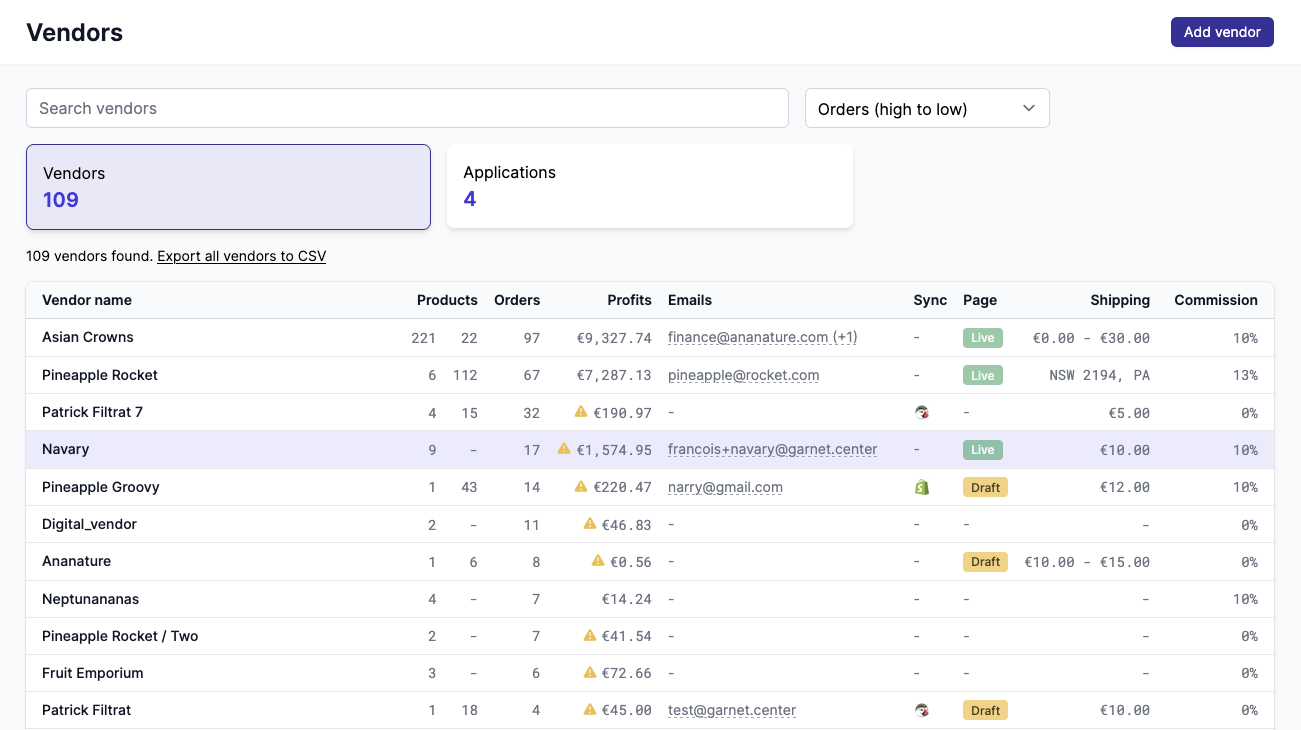
Columns, sorting options, and filters
The vendor list shows all active vendors on the marketplace.
- Each row displays the vendor name, active and draft product counts, orders, profits, emails, sync status, membership, shipping details, and commission. Some columns may be hidden based on your marketplace settings.
- You can sort by name, orders, products, commission, or profits. Use the search bar to filter vendors by name or email.
- Click any row to open the vendor detail page. Use the
Export all vendors to CSVbutton to download the full list. - You can also exports all vendors in one click. Click on the vendor email to copy the email.
When a vendor has local pickup enabled, a local pickup icon appears next to their shipping rates. Hovering the icon shows "Local pickup enabled".
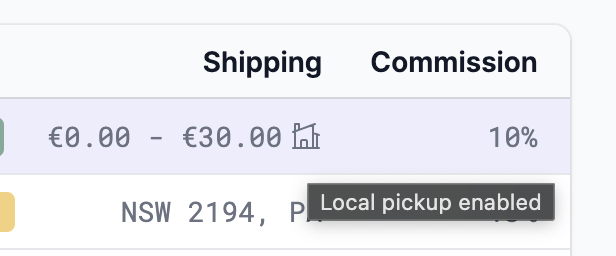
To learn more about the disaplayed values, refer to the vendors details page.
Marketplace view
By default, the marketplace is in Marketplace View. Switch to a specific vendor with Switch Vendor to see Garnet on their behalf.
The Marketplace View differs from the vendor view by:
- Including the
Vendorstab - Showing information across all vendors in every tab
- Displaying the vendor name in tables when relevant
- Including vendor names in exports