
Appearance
Garnet Product Releases
11 September - Import products without images
Garnet holds back a vendor's product until it has at least one photo, because sellers routinely save a product first and upload its pictures minutes later. Marketplaces selling services, made-to-order pieces, or a catalogue they illustrate themselves had no way around it. A new setting, Require a product image, turns that rule off. It sits in the Products column of the integration settings and is on by default, so nothing changes unless you turn it off — for one vendor under Garnet > Settings > Integrations, or for every new integration under Garnet > Admin Panel > Vendors > Settings. It applies to Shopify, WooCommerce, PrestaShop and Squarespace alike.
10 September - The admin panel menu moves into the hamburger
Opening Garnet > Admin panel on a phone showed the settings menu and the settings themselves side by side, leaving barely a finger's width for the page you came to read. The menu now sits behind the hamburger at the top left, the same way the main Garnet menu already does, and the settings get the full width of the screen. Tapping an entry opens it and closes the menu behind you. The Search settings... box, which filled most of the header on a small screen, is hidden there too. Nothing changes on a computer.
9 September - The messaging widget speaks the customer's language
The messaging widget and the Contact seller button showed their own text in English whatever language the customer was browsing your store in. Both now follow the storefront language, in eleven languages: English, French, German, Spanish, Italian, Dutch, Polish, Romanian, Hungarian, Arabic and Chinese. Any other language falls back to English. Text you typed into the settings yourself still shows as you wrote it, and you give each language its own wording in Translate & Adapt under Theme > Theme settings.
9 September - Vendor links can point to the vendor page
The vendor links component rewrote every vendor link on a product page to the vendor's collection. A new setting, Link to the vendor page instead of the collection, sends them to the vendor's own page instead, /pages/vendors/<vendor>, built from the Garnet Vendors metaobject. It needs a metaobject template in your theme; vendors whose profile is not published yet keep linking to their collection.
9 September - Archive a vendor application without emailing the vendor
Reviewing a vendor application under Garnet > Vendors > Applications now offers two ways to close it. Reject application, a red button that asks for a second click, moves it to a new Rejected status and sends the vendor the Application rejected email when it is enabled. Archive sets it aside under Archived and sends nothing, for applications you want out of the pending list without telling the vendor, like spam or duplicates. Both can be marked as pending again, and the status filter has a Rejected entry.
9 September - Rejection email for vendor applications
Rejecting a vendor application under Garnet > Vendors > Applications now sends the applicant an Application rejected email: a short, courteous note that their brand is not a fit for the marketplace at this time and that they are welcome to apply again. The button reads Reject application and asks for a second click. The email is customisable under Garnet > Admin panel > General > Notifications like the other vendor emails, and is on by default for new marketplaces. Marketplaces live before this release keep it off, so nothing is sent until you turn it on.
9 September - Product images in the integration products list
The products list of a vendor integration, under Garnet > Settings > Integrations and on the vendor page, now starts with a thumbnail of each product, and the product details modal shows it larger. Recognising a product no longer requires opening it on the vendor's site, which helps when several products share similar titles. Images come from Shopify, WooCommerce, PrestaShop, Squarespace and Google Sheets stores alike, and load only as you scroll to them.
9 September - Icons instead of emoji in the admin
The Sync column of the integration products list showed a ✅ or ❌ emoji, drawn differently on every operating system. It now shows a green check or a red cross icon, and hovering it tells whether the product is selected for import. The other emoji of the admin, in media error messages, the welcome checklist and metafield references, are replaced by icons the same way.
9 September - Commission shown on orders forwarded to Shopify vendors
Orders forwarded to a vendor's Shopify store now carry the marketplace commission as an order discount, Commission (10%) for a 10% commission, together with the customer's discounts when they are transferred to the vendor. The order total in the vendor's Shopify is the amount the marketplace owes them, so vendors no longer need to work it out from the tag or the payout email. This is the default for every new marketplace; marketplaces live before this release with three or more connected vendors keep the previous behaviour. See commission on the forwarded order.
9 September - Documentation search back to a compact list
The search box of this documentation showed a text excerpt under every result, which made the list long and hard to scan. Results are back to a compact list of page titles and section names, and the excerpt toggle is gone.
9 September - Famous marketplaces library in the website footer
The Famous marketplaces library, one page per well-known marketplace with how it works for sellers, is now linked from the footer of garnetmarketplace.com under Resources, next to the blog and this documentation, in every language of the site.
9 September - Choose which emails each vendor receives
A new Notifications card under Garnet > Vendors > (vendor) lets you tune a single vendor's emails without touching the marketplace settings. Click Edit and choose Marketplace Default, No notifications, or Custom to untick, among the emails your marketplace sends, the ones this vendor does not want: order placed, cancelled or refunded, product approved or unapproved, new chat message and new offer. The card shows the same choice at a glance. See choose which emails a vendor receives.

9 September - Resend a vendor's invitation link
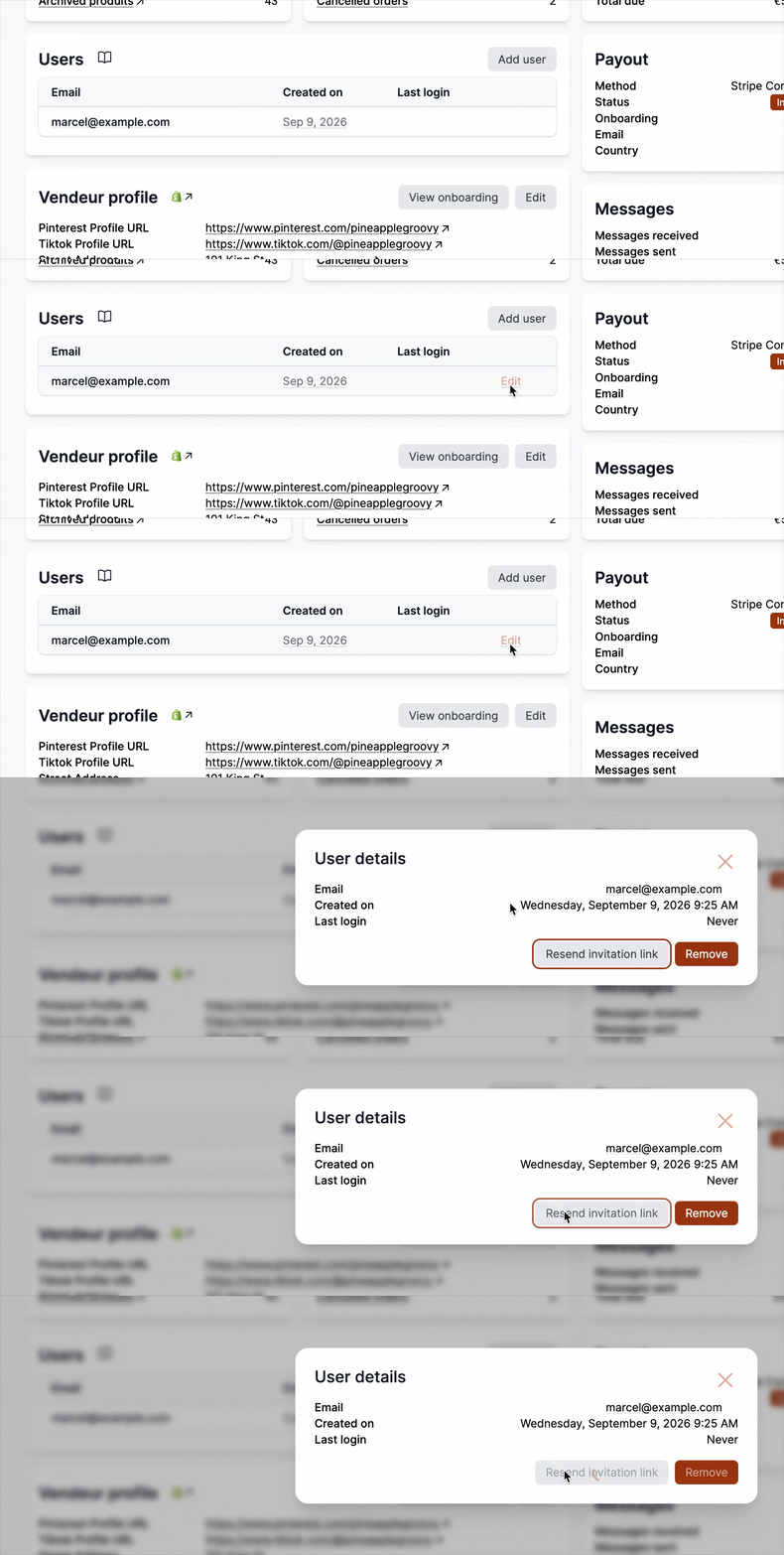
Hovering a user under Garnet > Vendors > (vendor) > Users now shows an Edit link instead of Remove. It opens the user's details, with their creation date and last login, and two actions: Resend invitation link, which sends a fresh invitation email when the first one never arrived or has expired, and Remove. See manage a vendor's users.
8 September - PayPal guide: enable Payouts on your account
The PayPal integration guide now explains that creating the PayPal app is only half of the setup: the Business account must also be approved by PayPal for Payouts before any payout can go through. Without it, PayPal accepts the API key but rejects every transfer with AUTHORIZATION_ERROR, which shows up on the payout page and in the daily automatic payout email. The guide lists what to check and reminds you that PayPal refuses a payout sent to the same account that pays it, which matters when you test with your own email.
8 September - Vendor page component
A new Vendor page section builds a vendor page without writing Liquid. Add it to the Garnet Vendors metaobject template and it shows the vendor name with their image on the right, then the products of their collection, paginated and without filters. The name and image come from the vendor metaobject, with the same image fallbacks as the vendor directory. Everything can be styled from your own theme CSS: turn Use default CSS off and target the stable #garnet-vendor-page hooks. See the vendor page component settings.
8 September - Vendor directory: pagination, responsive grid, aligned tiles
The vendor directory component no longer stops at 50 vendors when it reads the Garnet Vendors metaobjects: it now pages through all of them, with page links under the grid. Two settings decide the page size, Images per row and the new Rows per page (4 × 6 by default). The grid also adapts to the screen on its own: on a phone it drops to one or two columns instead of squeezing four, with a Minimum tile width setting to tune when it does. Vendors without an image keep the same square as the others, so names stay aligned across a row, and the default spacing is now 4 tiles per row with a 10 px gap.
8 September - Pay vendors from the marketplace's credit card
Stripe payouts can now be charged to the marketplace's own card instead of being transferred from the Stripe balance. Under Garnet > Admin Panel > Finance > Payout methods > Stripe Connect integration for payouts, set Payment source to From the marketplace's credit card and paste the Stripe customer that holds the card: each payout then charges the card and routes the funds straight to the vendor, in the vendor's currency, so the balance never needs topping up and vendors outside your Stripe region can be paid too. Stripe's card fee applies. The default stays From the Stripe balance, and the Stripe guide now compares both.
7 September - One membership option per Stripe price
Vendors now see every active price of a membership plan when they pick their plan, at first login and in the onboarding form. A plan with a monthly and a yearly price in Stripe shows as two options, so you no longer need to duplicate the product in Stripe to offer both. The billing period is also translated in the vendor's language, for instance 17,00 €/mois and 170,00 €/an in French.
7 September - Require a tracking number to fulfill
Marketplaces can now make the tracking number mandatory when vendors fulfill an order. Turn on Require a tracking number under Garnet > Admin Panel > Orders > Order fields: the Fulfill items button stays disabled until the vendor enters one, and the server rejects any fulfillment sent without it. Labels printed through Shippo, Easyship or Shipmondo already carry a tracking number, so they are unaffected. The setting is off by default.
2 September - Exchange rate applied automatically when a vendor connects
When a vendor connects a Shopify store that trades in a different currency than the marketplace, Garnet now fills in the price multiplier with the live exchange rate before importing the catalogue, so a $195 product lands at £145 on a GBP marketplace instead of £195. This only happens when the multiplier is still at its default of 1: a multiplier you set yourself, margin included, is never overwritten. The rate is a snapshot taken at connection time, so revisit it from time to time in the integration settings.
1 September - Reset a product from the vendor's store
When a marketplace product has drifted from what the vendor sells — a reworked title, an outdated description, replaced photos — you can now reset it in one click. On the product edit page, open View data in the Integration Context card and click Reset product: the title, description and images from the vendor's store are copied into the edit form, ready to review before saving. Price and stock are left untouched, and the modal now shows the vendor's description alongside the rest of the source data.

1 September - Products are archived instead of deleted
Delete product is now Archive product, in the product action panel and in the bulk actions of the product list. Instead of permanently deleting the product and its history, Garnet moves it to the Archived status in Shopify: the product leaves the marketplace, but its data and order history are kept, and a store admin can restore it at any time from Shopify > Products.
1 September - Clearer payout adjustments
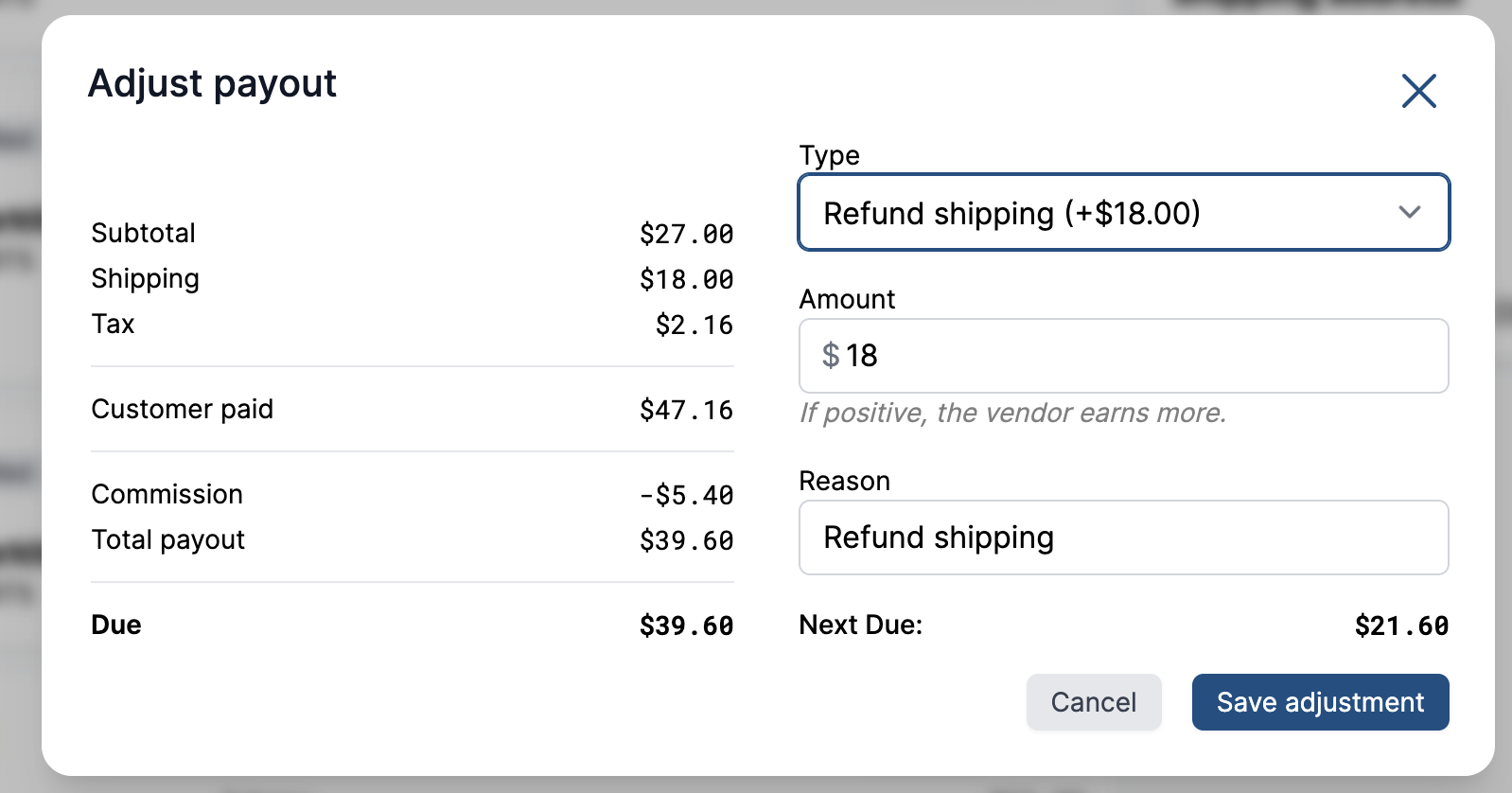
The payout adjustment dialog now previews the correction before you save it: the order's finance breakdown updates live as you type, showing the pending adjustment line and the resulting amount Due. The dialog also spells out how much more or less the vendor will earn — a negative amount pays the vendor more, a positive one records money as already paid — and adjustments now appear as Adjustment lines in the finance section instead of Paid, so bookkeeping corrections are no longer mistaken for money transfers.
1 September - Orders follow the selected products, on every platform
On an integration with Auto synchronise turned off, an order is now forwarded to the vendor only when it contains at least one product the marketplace selected for import — a product that is linked but not selected (a red cross in the integration's product list) no longer triggers the forward. The rule is also the same on every platform now: WooCommerce and Squarespace apply it too, where they previously forwarded every order.
31 August - Clearer Mollie connection guide
The Mollie integration guide now spells out the whole connection flow: create your Mollie app, paste its Client ID and Client Secret in Garnet > Admin Panel > Finance > Payout methods > Mollie integration, and approve the authorization page that opens. It also no longer asks for an API key — Garnet obtains its access token automatically when you approve, so that step is gone from the guide.

31 August - Integration card shown on every linked product
On a vendor's product page (Garnet > Vendors > (vendor) > Products > (product)), the Integration Context card tells you the product is synchronized from the vendor's own store. It used to depend on data stored on the marketplace product during import, so products linked another way — for example marketplaces migrated to Garnet — showed nothing. The card now reads the link straight from Garnet's records: it appears for every linked product, with the external id, a link to the product on the vendor's store, and the View data button to inspect the vendor's source product.
31 August - Use a vendor's own Shopify rates, and one Save for shipping settings
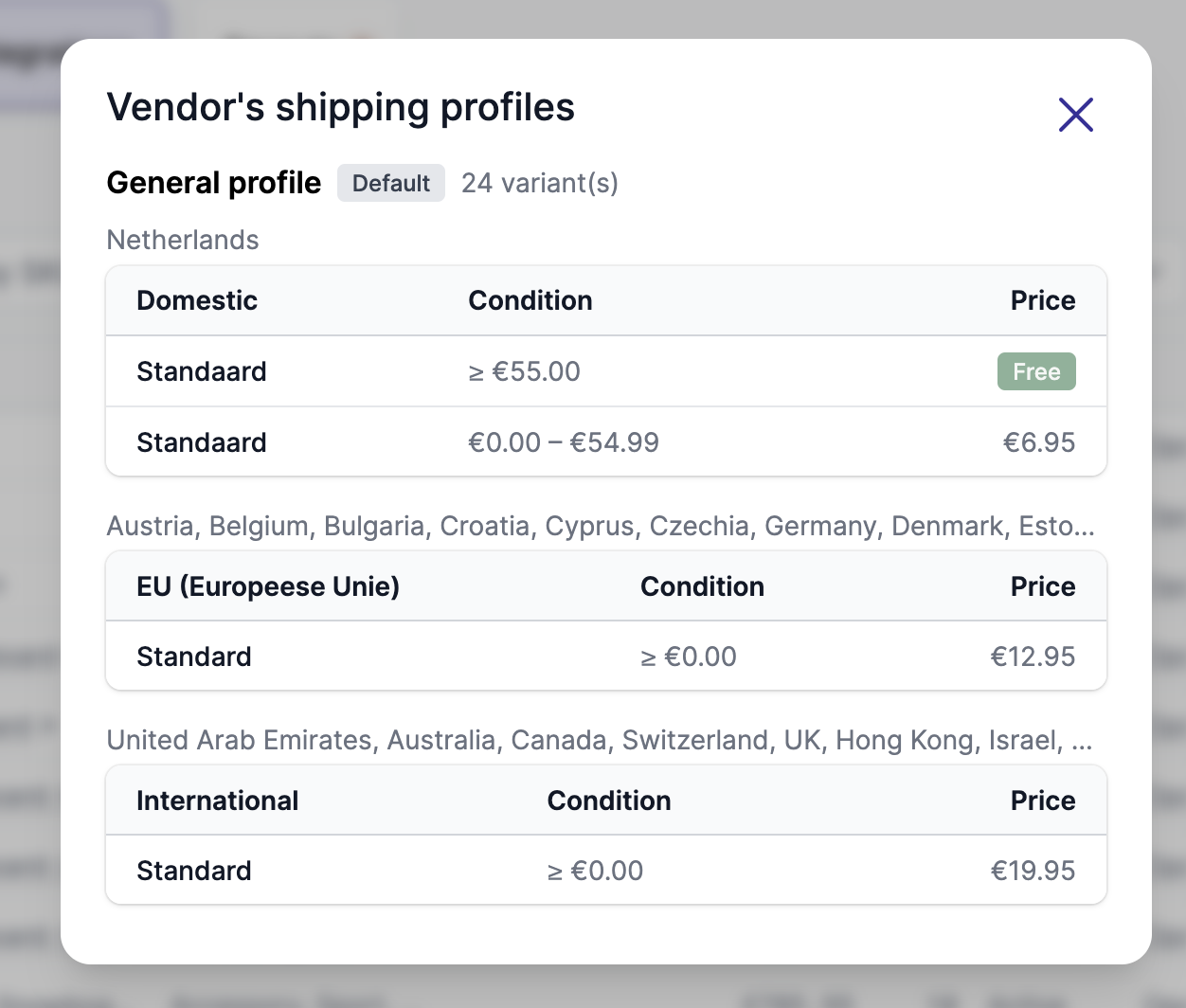
A vendor connected through a Shopify integration can now ship with the rates of their own store: in Garnet > Vendors > (vendor) > Settings > Shipping, the rate selector offers Use Shopify rates next to flat and live rates, and displays the vendor's shipping profiles — zones, conditions and prices — directly on the page. This replaces the Shipping button on the integration page.
The shipping settings page is also a single form now: the rate type, flat-rate zones and local pickup are saved together with one Save button instead of one per section.
31 August - Vendor count updates after removing a vendor
After removing a vendor, the vendor count above the vendor list kept its old value until the page was fully reloaded. It now refreshes on its own, when a vendor is removed and when one is added.
27 August - Product sync survives a vendor restructuring their variants
When a vendor reworked a product's options on their own store — for example turning a single-variant product into one with several offers — the product sync could be rejected by Shopify, and the product stopped updating on the marketplace entirely. The marketplace product now follows the vendor's new option structure: new variants are created as expected, and variants kept for order history are carried over as sold-out choices under the new options.
26 August - Working breadcrumb on the fulfill page
When fulfilling an order, clicking the order number in the Orders > #1234 > Fulfill breadcrumb kept you on the same page. It now takes you back to the order, and Orders back to the order list.
21 August - Order webhooks documented for API integrations
The API integration documentation now covers order webhooks: the orders/create and orders/updated topics, how to verify the HMAC signature of each delivery — with a ready-to-use code sample — and a complete test order payload. Contact us to register your webhook URL and receive your webhook secret.
21 August - Orders follow the products for selective integrations
On a Shopify or PrestaShop integration with Auto synchronise turned off, orders are now only forwarded to the vendor's store when they contain at least one product imported through the integration.
21 August - Redesigned integration settings
The integration settings page now opens with an at-a-glance summary: synchronization scope, price transform, auto synchronisation and status. With every setting gathered in a single Edit modal, organised in Products and Order & Tracking sections. The same layout is used for the marketplace's default integration settings.

21 August - See a vendor's Shopify shipping rates from Garnet
For Shopify integrations, the Shipping button on the vendor's integration page now lists the shipping profiles the vendor configured on their own store — zones, conditions and prices — so you can verify what the buyer will be charged without asking the vendor for screenshots. Rates quoted live by a carrier app show as Calculated at checkout.
21 August - Pause product, order or tracking sync per integration
Every part of a vendor integration's synchronisation can now be switched off independently, whatever the platform — Shopify, WooCommerce, PrestaShop, Squarespace or the API. Alongside the existing product sync scope, the integration settings gain a toggle to stop forwarding orders, another to stop tracking updates coming back, and a master switch to pause the whole integration at once — handy for a vendor going on a break without losing their setup.
20 August - Better support for manual tracking upload with integrations
20 August - Better support for multi-currency orders
19 August - Point any link at a conversation
A Contact seller button is no longer the only way into the chat. Any link or button in your theme can now open a conversation by carrying the address of that conversation in a data-garnet-messaging attribute — /_garnet/messaging/chat-on-product/<product id> for a product, or /_garnet/messaging/chat-on-vendor/<vendor name in base64> for a vendor. Useful when the chat belongs somewhere the component cannot go: inside a vendor card, a size-guide block, an FAQ accordion, or your own custom product template.
Both messaging setups understand it. With the Messages Widget enabled the conversation opens in the floating chat without leaving the page; without it the browser simply follows the link's own href, so point that at your messages page and classic messaging keeps working unchanged. See start a conversation from your own markup for the Liquid to copy.
19 August - Extra protection for vendor profile data
We have added extra protections around the files vendors upload on their profile — logos, registration documents, certificates. Nothing to turn on, and vendors keep uploading them exactly as before.
19 August - Products are imported once they have an image
Vendors commonly save a product first and upload its photos a few minutes later. Garnet imported it in that gap and the product arrived on your marketplace with no picture — and on an integration set to Price and Stock Only, the most common scope, it stayed picture-less for good, because that scope never touches images after the first import. On a busy marketplace that quietly added up to hundreds of products with nothing to show. Garnet now waits for the first synchronisation where the product has at least one image, then imports it with its photos. Nothing to turn on, and products already on your marketplace are untouched. Applies to Shopify, WooCommerce, PrestaShop and Squarespace — see products without images.
17 August - Support legacy locations in Shopify integrations
Some vendors still ship from legacy locations, the deprecated kind that Shopify fulfillment apps manage on their behalf. Those locations were missing when a vendor picked which locations to sync; Garnet now has a dedicated workflow for them, so their inventory syncs like any other location.
14 August - Faster product export for PrestaShop vendors
Export CSV on a PrestaShop vendor's product list used to take over a minute on a large catalogue, long enough that people assumed it had failed. The same export now finishes in about 12 seconds. The file itself is unchanged.
14 August - Add more currency conversion support
Currency conversion now covers more than 150 currencies, up from 30.
A vendor who prices shipping in their own currency, such as a flat rate in THB in a GBP store, has that rate converted to your currency before the customer sees it. Currencies like KES, AED or EGP used to be dropped from the checkout; they all convert now. Nothing to turn on, and rates refresh daily.
13 August - Search missing vendors
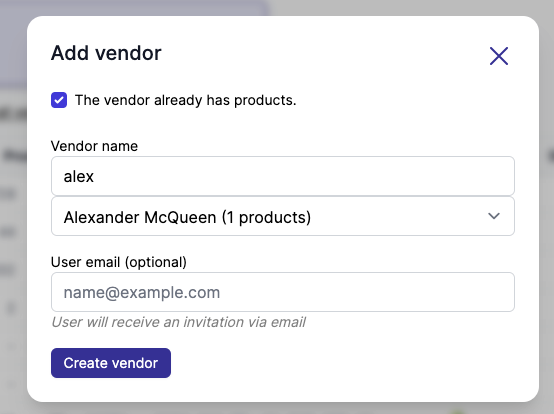
When creating a new vendor or when renaming a vendor, you can now search through the list of vendors. Especially useful when the marketplace has over 1,000 vendors.
13 August - Specifications are now product fields
The data you ask vendors to fill on their products, such as Material or Country of origin, is now called product fields throughout Garnet. The name makes more sense than "specifications" and is less confusing: these are business fields you define, not technical specs. Garnet > Admin Panel > Products > Specifications becomes Products > Product fields, and your fields and data are untouched. See product fields.
13 August - See how many vendor fields you have left
Shopify allows 40 fields on a vendor profile, and nothing told you how close you were until it stopped accepting new ones. The Vendor fields title in Garnet > Admin Panel > Vendors > Profile now carries the count — Vendor fields (12/40) — and turns red once all 40 are used, so you can retire a field you no longer collect before you need the room. See the field limit.
13 August - Rename a vendor onto a name already in your catalogue
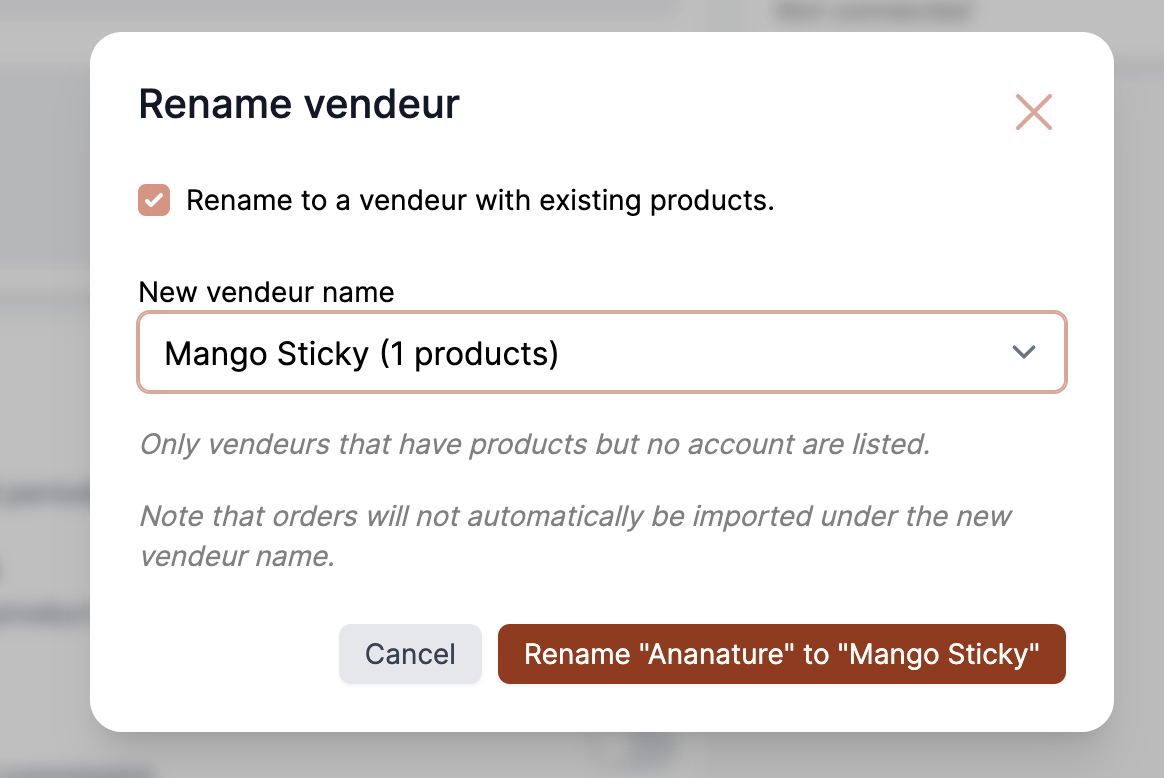
Renaming a vendor to a name your products already carry meant typing it exactly as Shopify holds it — one wrong character and you were left with a third vendor name instead of the merge you were after. Rename vendor now has a Rename to a vendor with existing products tick box that lists the vendor names found on your products, each with its product count, so you pick the name instead of spelling it. Only names that have products but no Garnet account are offered: renaming onto a vendor that already has one would overwrite their settings. See rename a vendor.
13 August - Garnet Seller tested with WordPress 7.1
WordPress 7.1 lands on 19 August. Garnet Seller 1.3.2 is tested against it, so the plugin keeps showing as compatible on its listing rather than warning WooCommerce vendors that it might no longer be maintained. Nothing changes in how it works: 7.1's changes are all in the WordPress editor, which Garnet Seller does not touch.
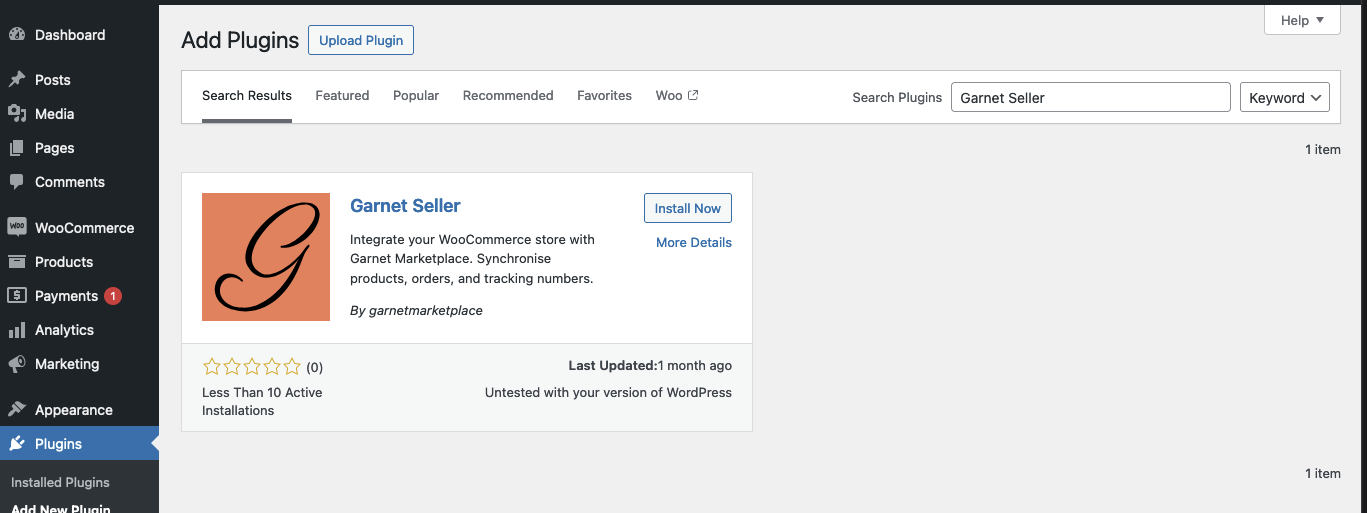
12 August - Simpler WooCommerce setup for vendors
Connecting a WooCommerce store used to lock the vendor out of their WordPress admin until they approved an authorisation screen. The Garnet Seller plugin now connects in two steps, activate it and paste the integration key, and warns the vendor if a store setting would block synchronisation. See the WooCommerce integration guide.
12 August - The admin panel, revamped
Settings used to be filed by how they were built: anything with an API key under Integrations, a grab-bag of switches under Features. Both are gone. Payout providers now sit under Finance next to commission, carriers under Shipping, and email providers on the same page as the templates they send. Invoicing gets its own page instead of being the third panel of another one. What is left over — notifications, branding, team, languages, analytics — is under General.
Page addresses changed with the names, so bookmarks into the admin panel need updating, and the interface language override moved to your profile menu. Cmd-K searches every setting by name.
9 August - Customs codes on vendor products
Selling across borders means every product needs a harmonized system code and a country of origin, or Shopify cannot work out the duties at checkout. Vendors can now fill both in themselves: add two product specifications named Harmonized system code and Country code of origin, and Garnet writes them onto the product's customs information in Shopify. The country one shows the usual country picker, and the code is checked before it is saved — 6 to 13 digits, written with or without dots.
7 August - Shipping rates from the vendor's Shopify store (beta)
A third way to price shipping, alongside flat and live rates: at checkout the vendor's own Shopify store quotes the rate, so whatever they already set up there — flat weight bands or a live UPS, FedEx or DHL account — is what your customer sees, converted to your currency. The vendor needs Garnet Seller installed and their products linked to yours. Contact us to get early access to the beta.
5 August - Force vendors through their onboarding
Vendors who register but never finish their profile leave you with nothing to sell. Turn on Force onboarding on login in Garnet > Admin Panel > Onboarding and any vendor with a required field still empty is sent back to the form each time they open Garnet, until it is complete. Optional fields never hold them there. See force onboarding on login.
4 August - Better image support
Uploads into a product specification no longer care what the file is called. A wrong extension, or none at all, used to get the file rejected. You can also send several files at once.
3 August - Garnet Seller tested with WordPress 7.0
The Garnet Seller plugin for WooCommerce vendors is now version 1.2.1, tested against WordPress 7.0. Its listing used to warn that the plugin was untested and might no longer be maintained, which gave vendors pause before installing it. It also asked for WordPress 6.8.1 or newer, so older stores never saw the update. 6.2 is enough, and they will get it now.
3 August - Reset the profit window
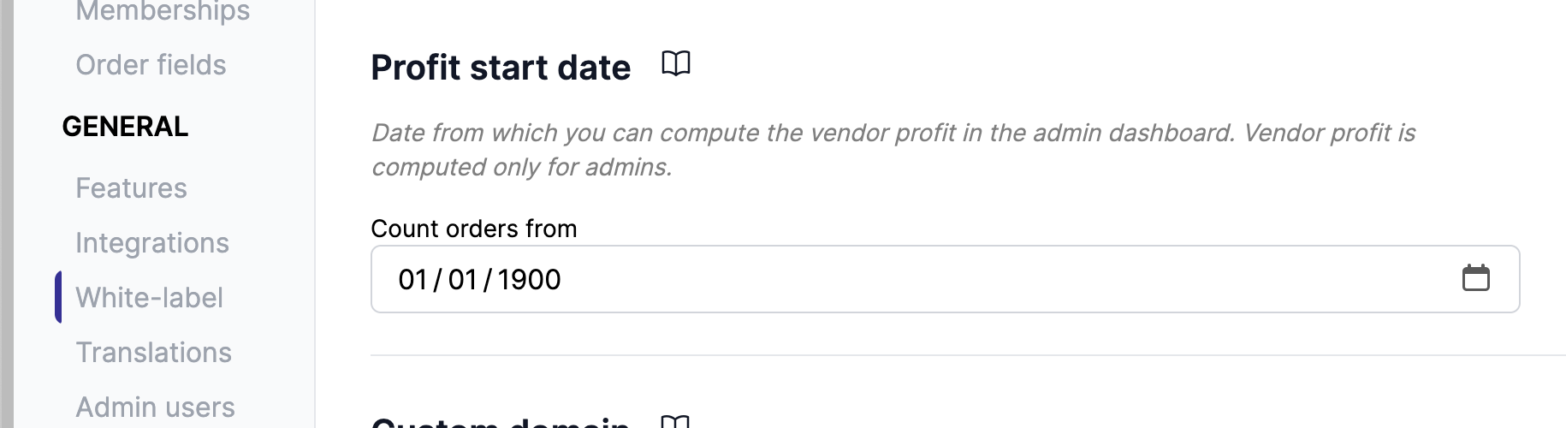
Moved to Garnet with years of trading behind you? The vendor Profits, Total sales, Total commission and Total due figures can now start from the date you joined, instead of counting a back-catalogue settled on your previous platform. Those orders were sold under different commission terms, so counting them reports a commission Garnet never took. Only the admin's vendor totals change. Set the date under Admin panel > White-label.
1 August - Search the warehouse address instead of typing it
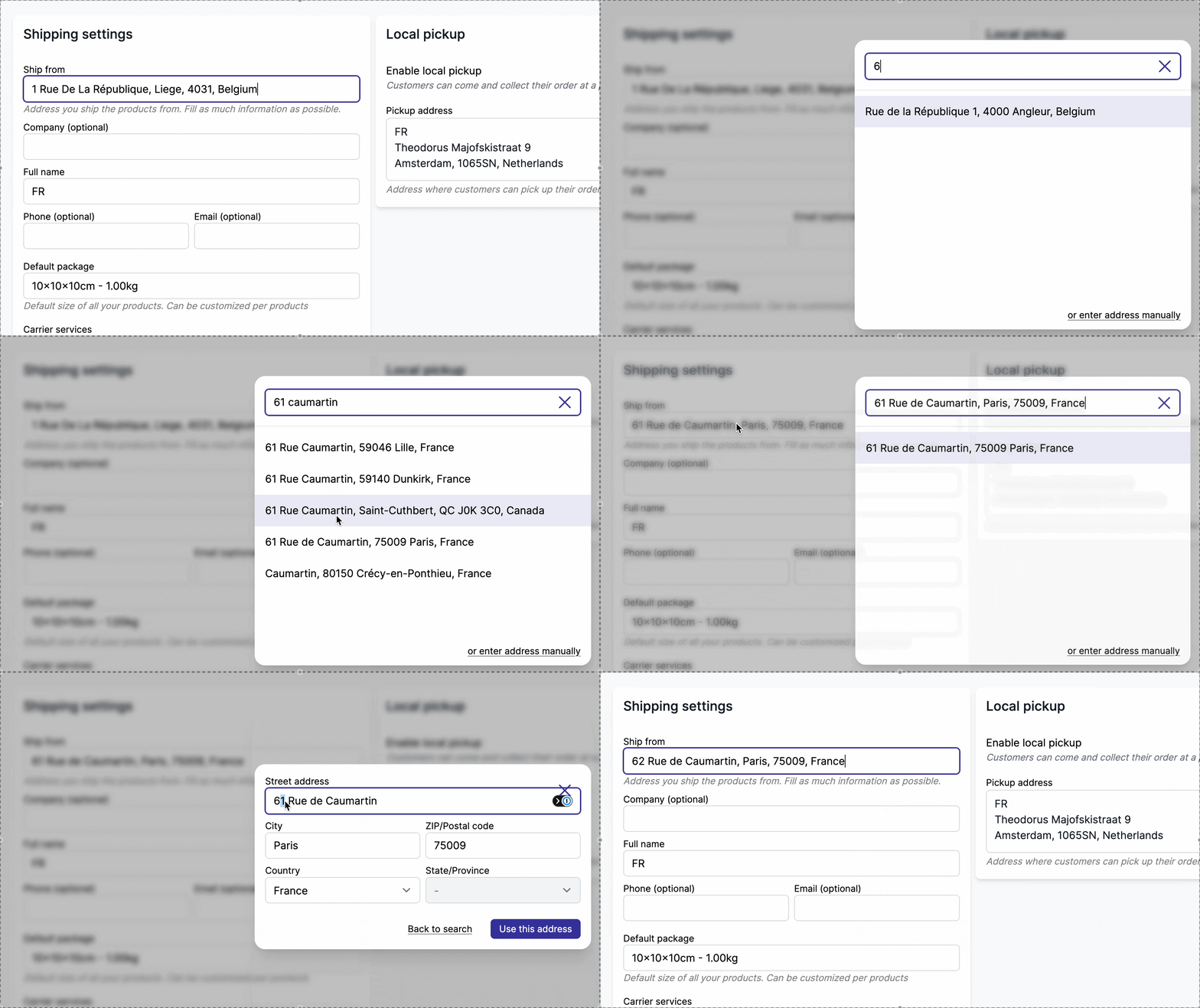
Vendors setting their warehouse address in Garnet > Settings > Shipping can now search for it instead of filling in every field by hand. Type a few characters, pick a suggestion, and the street, city, postcode, state and country land in place. A mistyped postcode makes live rates fail or come back wrong. An address the search can't find can still be typed with or enter address manually. See vendor setup.
31 July - Stripe shortcut opens the connected account
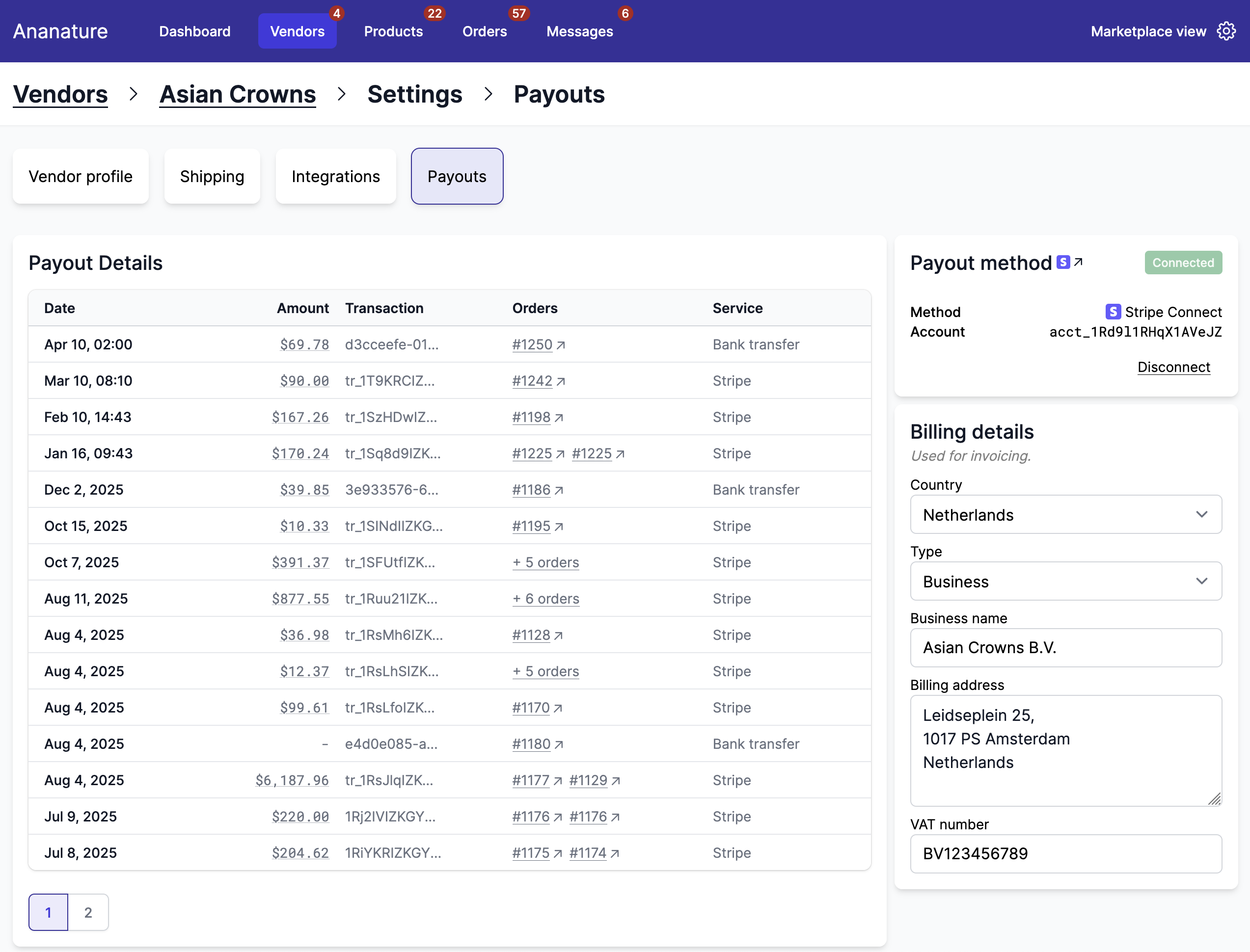
The Stripe icon next to Payout method on a vendor's payment settings now opens that vendor's Connect account activity in your Stripe dashboard. It used to try to open the account as if it were your own. One click now takes you from a vendor to their payments, payouts and balance in Stripe. See payout onboarding.
27 July - Fix tracking forwarding on large orders
Tracking information stopped forwarding to the marketplace on orders with more than 50 items. Fixed. Every line of the order is now read, however many vendors or items it holds.
24 July - Messaging docs: classic vs modern
We reorganized the messaging documentation so the two storefront theme components are easy to tell apart. The classic setup is a dedicated messages page. The modern one is a floating, Messenger-style widget that follows the customer around the store. Each has its own step-by-step guide, and the overview tells you which to pick.

23 July - Custom options improvements
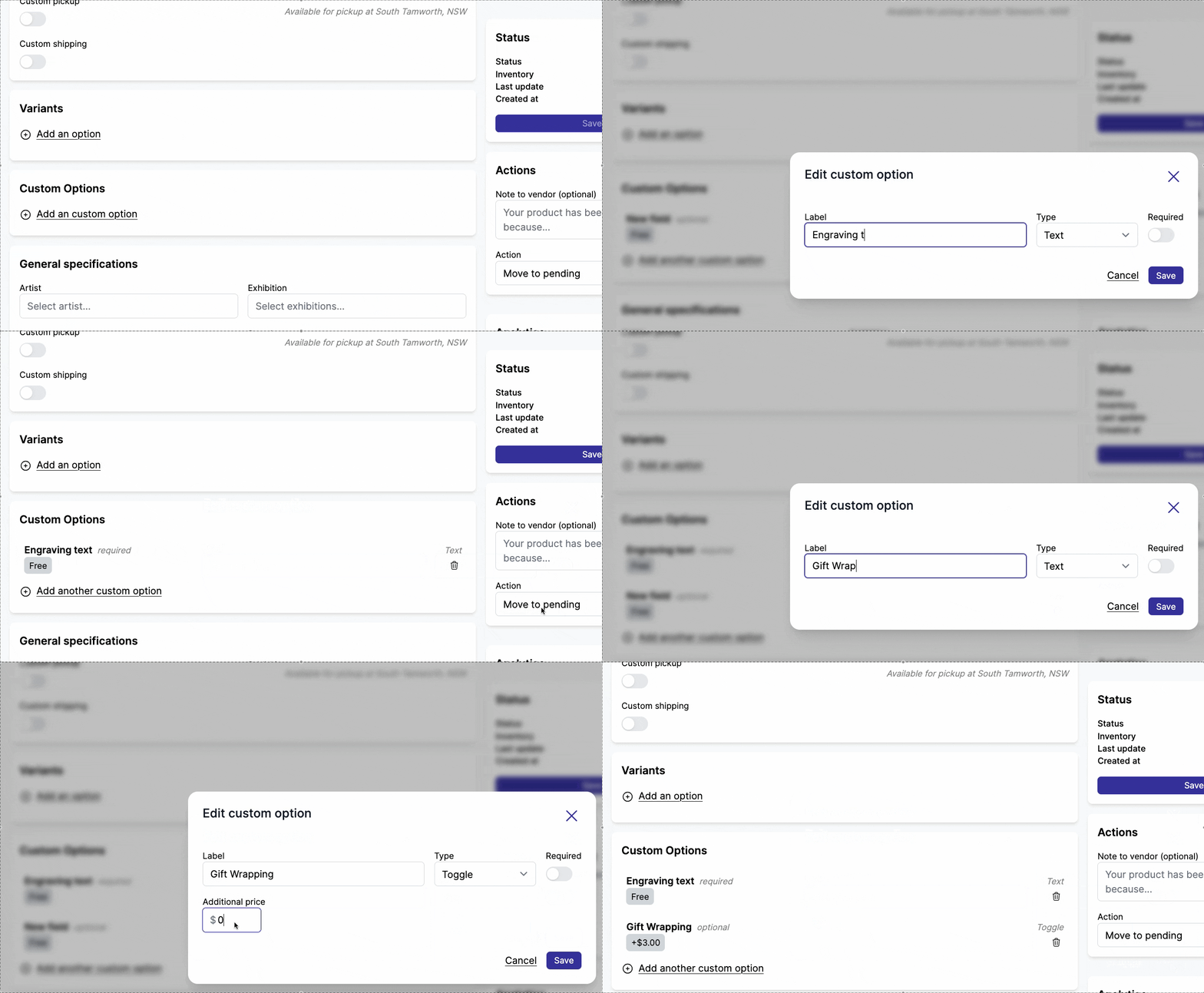
Vendors can now reorder custom options by dragging them into place, and the product page shows that exact order. Deleting an option removes it from the storefront for good. The types are tidier too: the on/off option is called Checkbox, and the little-used Long text type is gone.
22 July - Marketplace directory is live
Our new marketplace directory is live: 60 real-world online marketplaces, successes and cautionary tales alike, each with its status, business model, GMV and what it's known for. Filter by status (Active, Acquired, Struggling, Defunct) or region, then sort by GMV, name or newest first.

22 July - Combined live rates from one warehouse
When several products in an order ship from the same address, Garnet now combines them into one live rate covering every package. Each vendor used to get its own rate request. A single multi-package shipment usually costs less than the sum of the separate ones, so customers stop paying twice for items leaving the same warehouse.
21 July - Disable duplicate product
Marketplaces can stop vendors from duplicating products. Turn on Disable duplicate product under Admin Panel > Features > Products and the Duplicate button disappears from the product page. Handy when listings are managed centrally and vendors shouldn't spin off copies.

20 July - Payout adjustments
Admins can now adjust a vendor's payout on any order, up or down, straight from the order's Finance section. Presets cover the common cases in one click: Refund shipping, Refund taxes, Refund discounts and Refund commission prefill the amount for you. The dialog shows the resulting amount Due before you save. Each adjustment lands as its own payout line.
20 July - Custom domain naming rules
We updated the custom domain documentation to specify that subdomains accept only letters, digits and hyphens. Underscores (_) don't work.
20 July - Hide the product tab
You don't need the product tab? Hide it. Useful when listings are managed centrally by the marketplace or come from a shared catalog rather than being maintained by vendors themselves. Turn it on under Admin Panel > Products > Features.
18 July - Redesigned dashboard
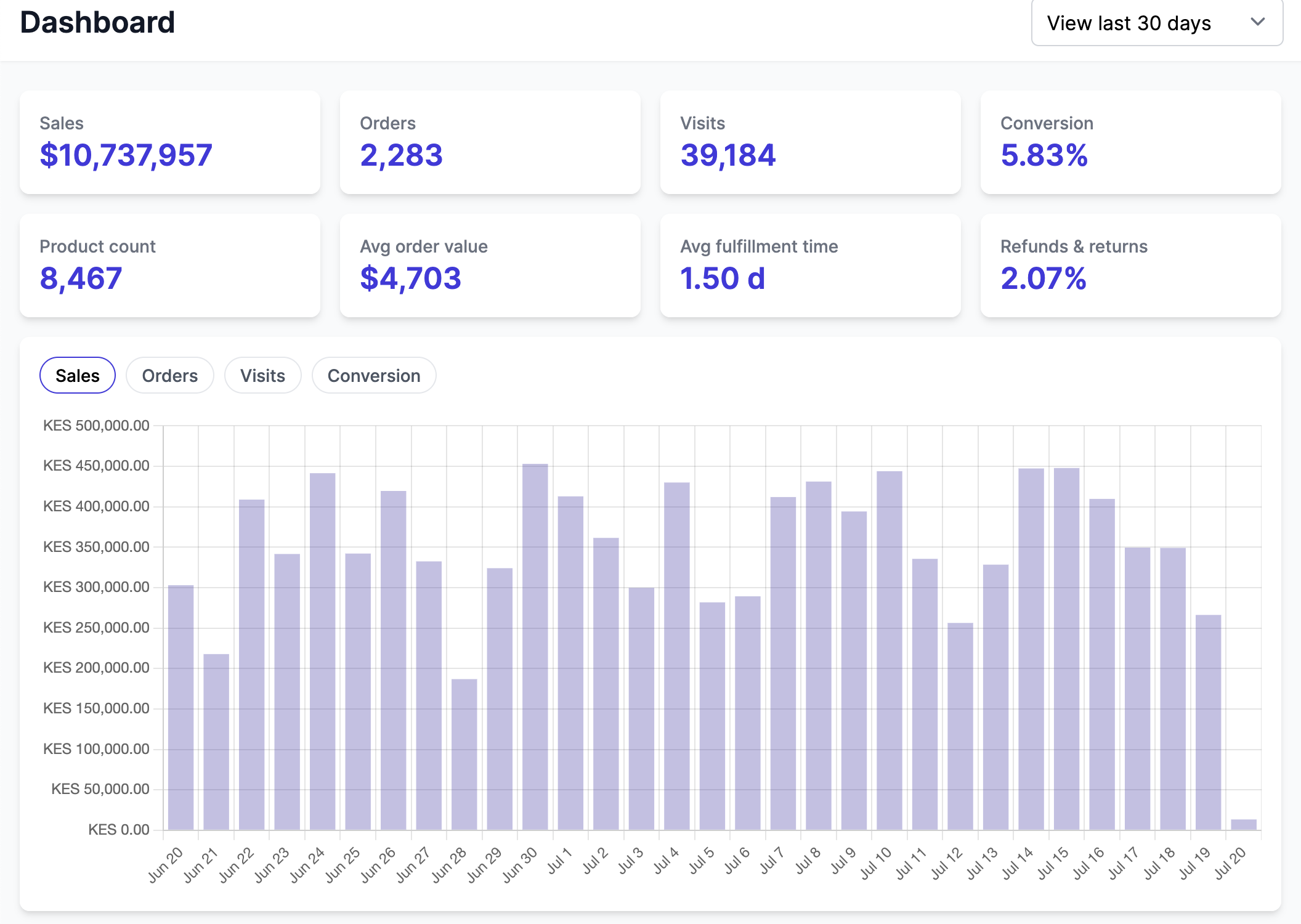
The dashboard has been rebuilt from scratch. A scorecard holds your key numbers over 7 days, 30 days or 12 months, a trend explorer plots any metric over time, and to-do panels surface what's waiting on you: items to fulfill, ongoing refunds and returns, and vendors at risk of going dormant. Admins can also open a vendor's dashboard straight from the vendor page with the new View dashboard button.
16 July - Metaobject-based vendor directory
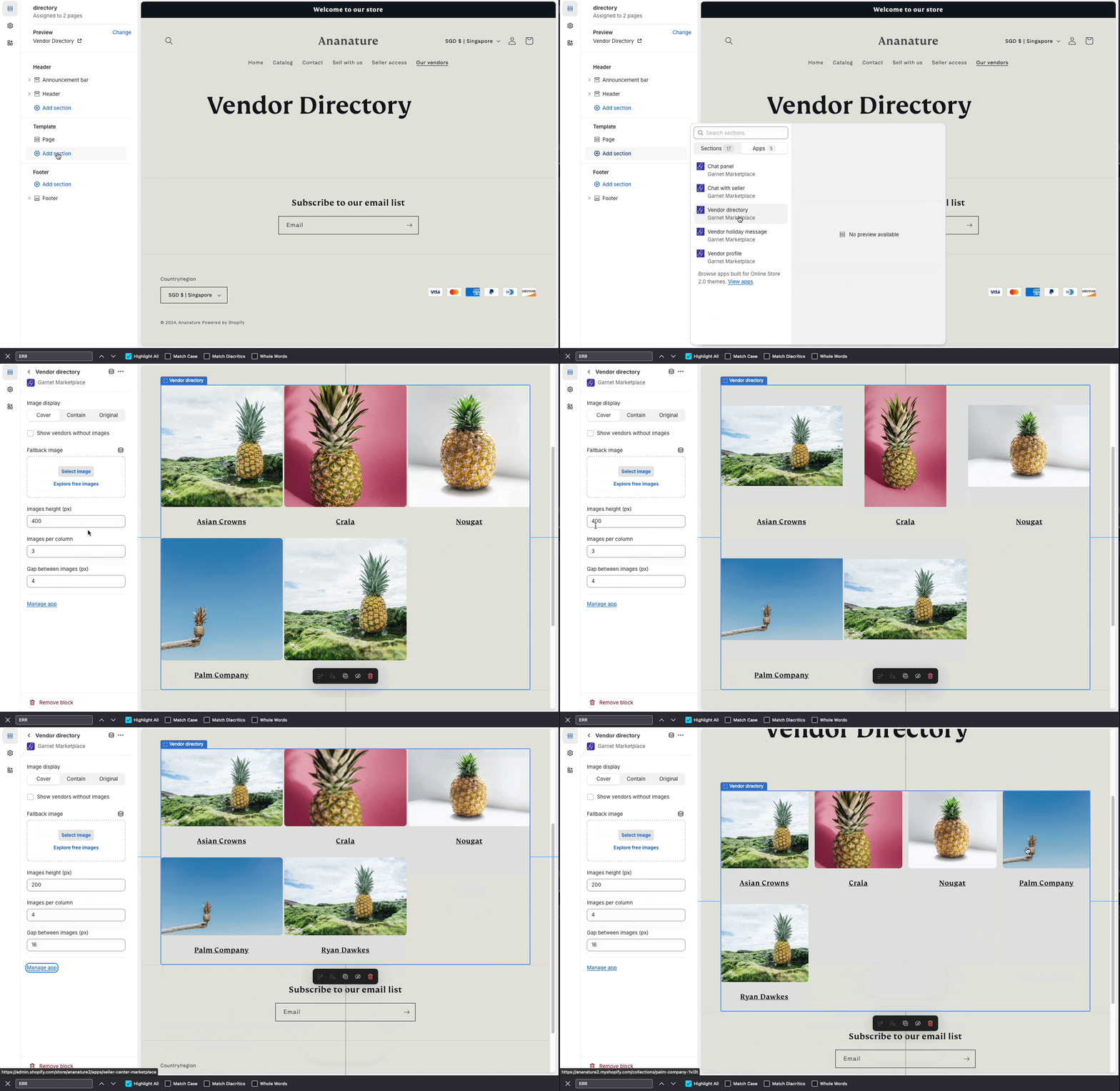
Your vendor directory component can now read vendors from Garnet Vendors metaobjects instead of vendor collections. Turn on Use metaobjects instead of collections in the component settings. We recommend it for marketplaces that started with Garnet after May 2026.
14 July - Floating messages widget
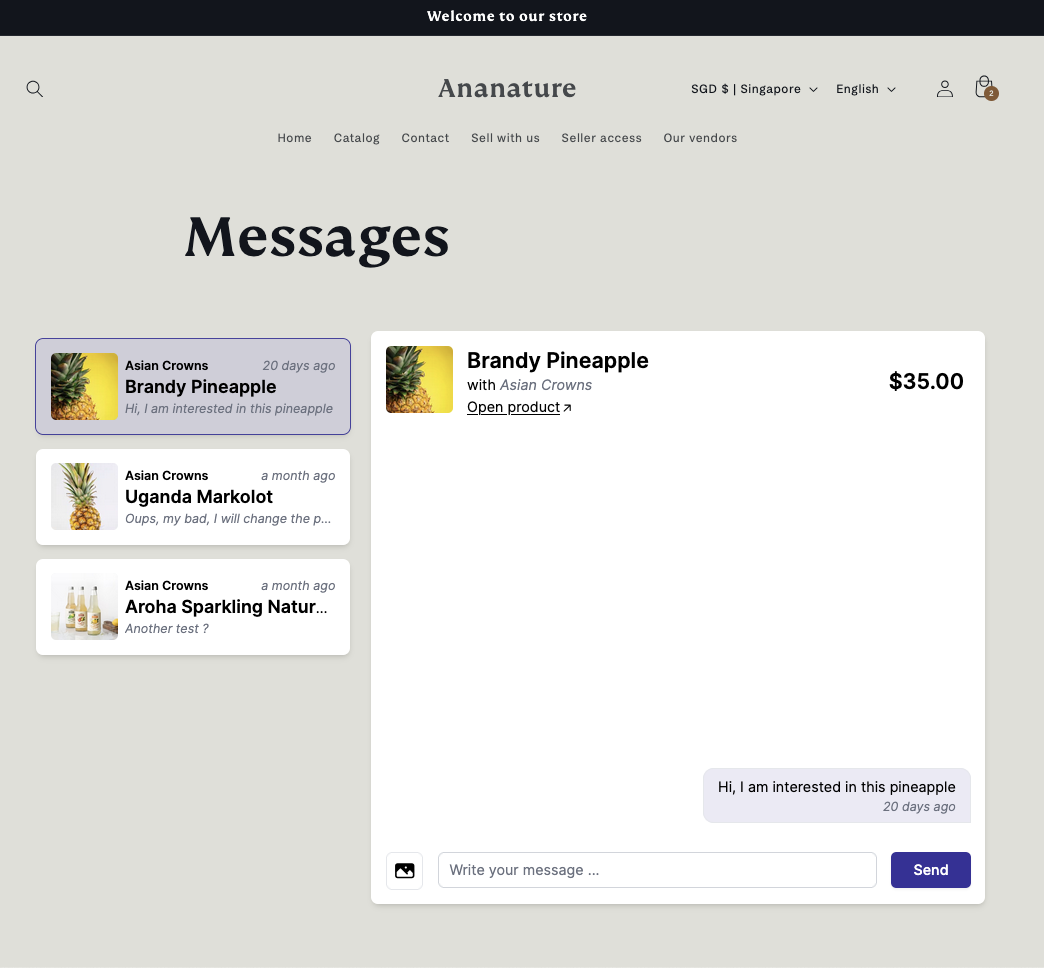
A new floating messages widget is available for your Shopify theme. It puts a Messenger-style chat dock in the bottom-right corner of every page, so signed-in customers can read their conversations and message sellers without leaving whatever they were looking at. The Contact seller button opens it in place instead of navigating away.
13 July - Garnet landing page in 16 languages
The Garnet landing page now speaks 16 languages. Visitors browsing in one of them get the marketing site in their own language, with nothing to click.
10 July - Faster, customizable messages component
Built natively in your Shopify theme instead of loading the Garnet app in an iframe, the storefront messages component appears faster and feels like part of your store. Keep the clean default styling, or write your own CSS to match the theme exactly.
9 July - Grouped fields in the application setup
The application field picker now groups profile fields by their vendor-profile sections, the same way the onboarding editor does. Custom sections you created in the vendor profile, say a Qualification questions group, show up grouped when you choose which fields appear on the application form.
9 July - Support for product bundles
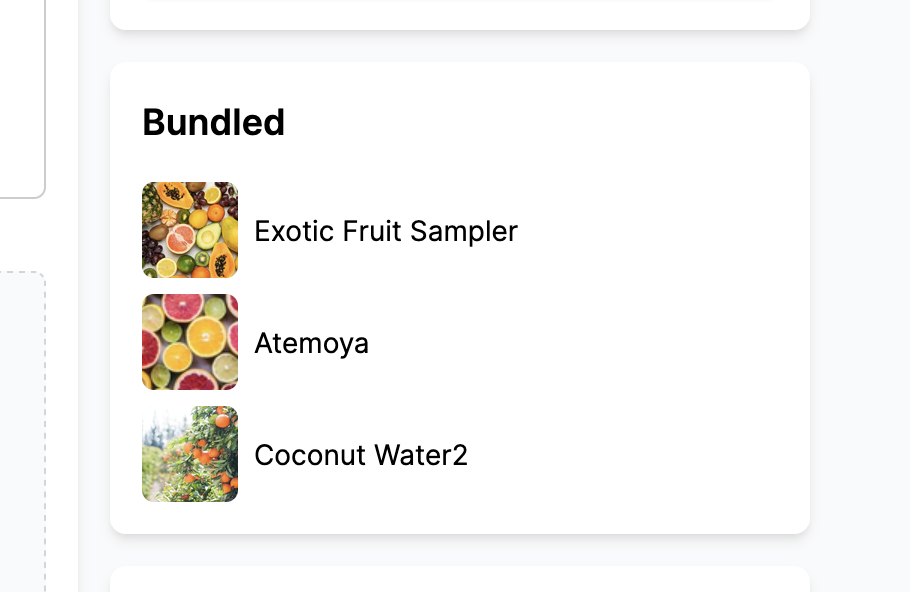
Garnet now recognises product bundles. They carry a [Bundle] prefix in the product list, and their listing shows a Bundled card with the products inside. A bundle's stock comes from its components, so the quantity field is disabled: vendors change availability by editing the individual products.
9 July - New vendor login component
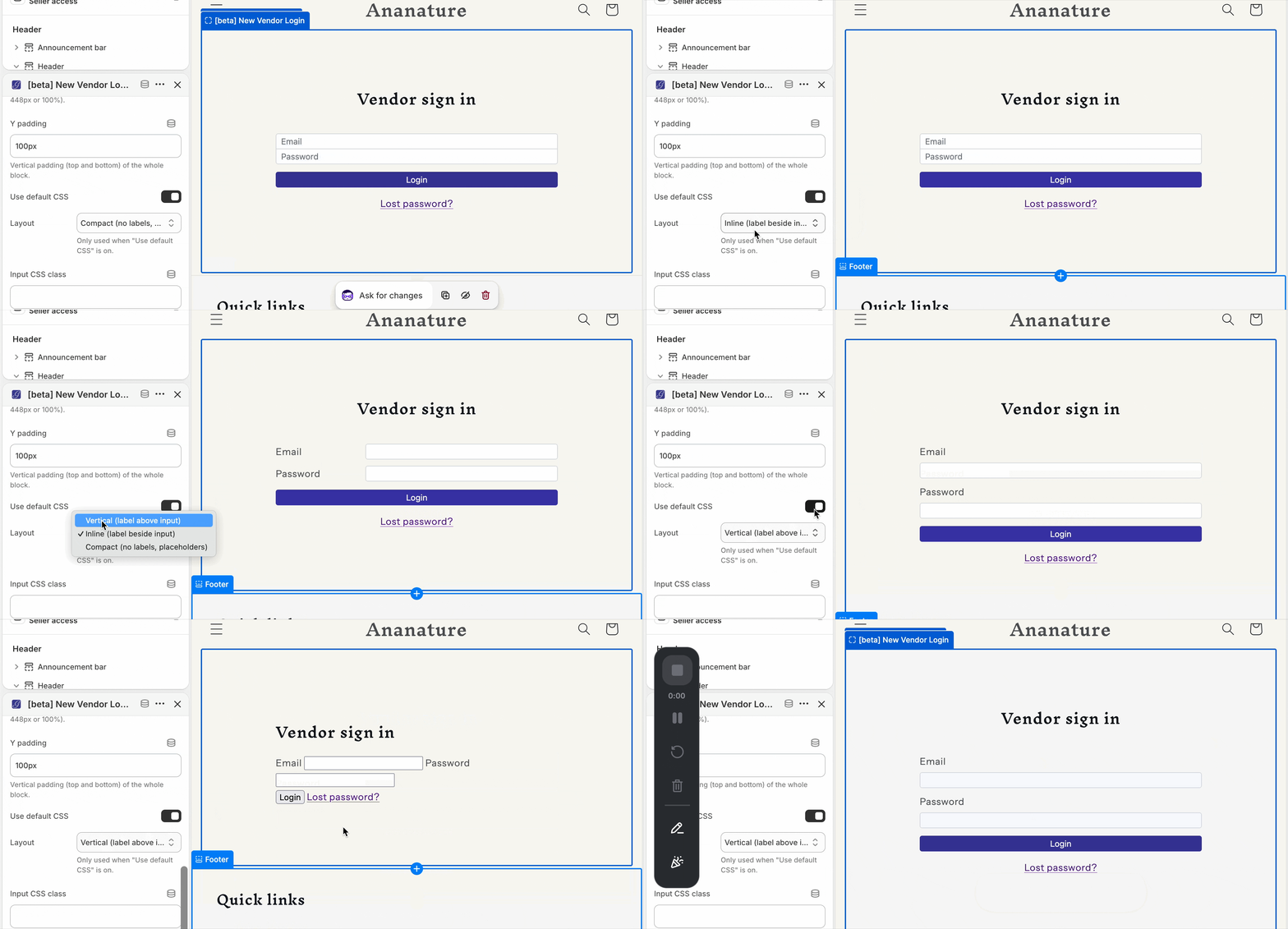
A new vendor login component is available for your Shopify theme. It ships with a clean default design and three layouts (compact, vertical, inline). Title, button, colors, error message, spacing: all of it is customizable. Vendors sign in from your storefront and their dashboard opens in a new tab.
8 July - Cancellations reach WooCommerce vendors
Cancelling an order on the marketplace now cancels it on the vendor's store for WooCommerce vendors too, as it already did for Shopify ones. Nothing used to tell them, so the order sat in Processing and could still be picked and shipped after the customer was refunded. Orders the vendor already moved to Cancelled or Refunded are left alone. One caveat: WooCommerce puts the items back in stock, even when the marketplace chose not to restock.
8 July - Pending vendor applications shown by default
The vendor applications list opens on the Pending filter instead of All, so what's waiting for your review comes first. All, Accepted and Archived are still one click away.
7 July - Return to the vendor page after switching back
Switch to a vendor from the vendor details page, then switch back to the marketplace view, and Garnet returns you to that vendor's page rather than the dashboard. Reviewing several vendors in a row is quicker that way.
2 July - URL specification type
You can now create a URL specification to collect web links from vendors: a product page, a social profile, a mailto: or tel: link. Garnet checks the value is a real URL, and you can restrict entries to a list of allowed domains.
