
WooCommerce integration
Garnet integrates products from any WordPress store using the WooCommerce plugin. Our own plugin, Garnet Seller, is published on the official WordPress plugin directory: the vendor installs it, pastes an integration key, and the store is connected.
Integration scope
- ✅ Easy install with Garnet Seller
- ✅ Connect to several marketplaces
- ✅ Product synchronisation
- ✅ Order synchronisation
- ✅ Order cancellation
- ✅ Fulfilment status
- ✅ Tracking synchronisation - Supports popular carriers
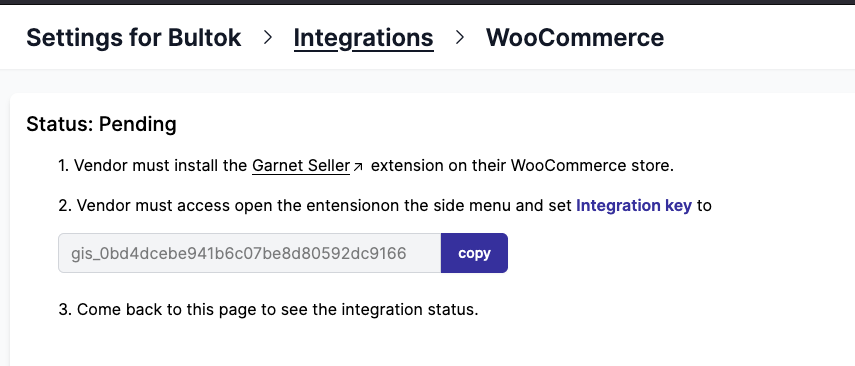
1. Get the integration key in Garnet
The marketplace and the vendor can get the integration key in Garnet > Settings > Integrations > WooCommerce
2. Install and activate the Garnet Seller extension
The vendor must install the Garnet Seller extension from Wordpress plugins. The extension has been officially approved by the WooCommerce plugin directory.
The extension requires WordPress 6.2 or later and is tested up to WordPress 7.1 (13 August 2026).
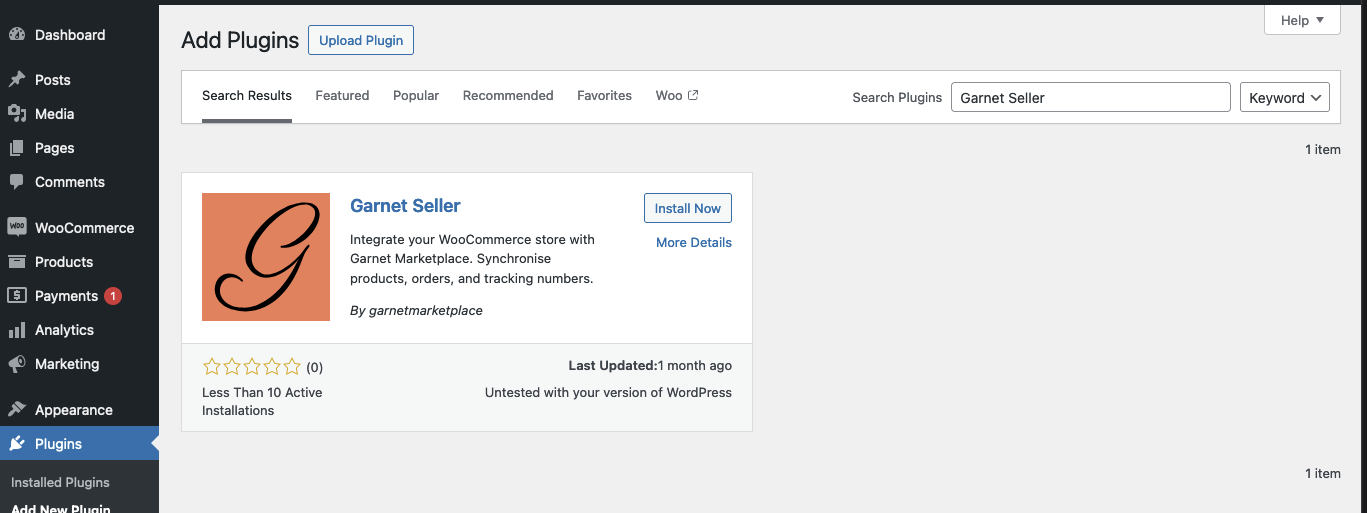
The app can either be found in WooCommerce > Plugins > search: Garnet Seller or directly downloaded from the Wordpress plugins list.
3. Paste the integration key
Open Garnet Seller in the WordPress menu, paste the integration key, and click Connect.
That's it, the WooCommerce store is integrated. All products will be imported in Garnet Marketplace within a few minutes.
Manage the marketplace connections
The Garnet Seller page lists every marketplace the store is connected to, with the name the vendor sells under, the number of imported products, the commission, the marketplace currency and the price rule applied to the vendor's prices.
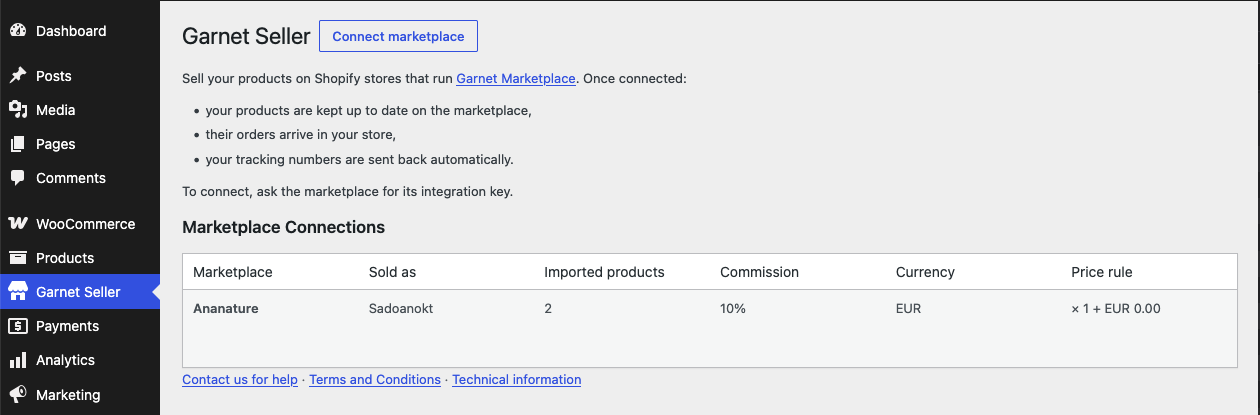
- Connect another marketplace: click
Connect marketplacenext to the page title and paste that marketplace's integration key. A store can be connected to several marketplaces at once. - Edit the price rule: hover the marketplace and click
Edit price ruleto change the multiplier and the amount added to each price. The link is hidden when the marketplace does not let vendors edit their integration settings. - Disconnect: hover the marketplace and click
Disconnect, then confirm. Products stop syncing with that marketplace and its orders no longer reach the store. The same integration key reconnects it later.
The page is available in English, French, German, Spanish, Italian and Dutch, following the language of the WordPress user (WordPress 6.5 or later).
TIP
A marketplace just connected can take a few seconds to appear in the list. Reload the page if it is not there yet.
How to locate marketplace orders
Each order created by the marketplace includes custom metadata to help vendors identify it:
- Payment method: Set to the marketplace name (e.g.
MyMarketplace) - Order meta data: Two fields are added —
Marketplace(the marketplace name) andMarketplace Order(the original order number, e.g.#1042)
To find marketplace orders, go to WooCommerce > Orders and search by the marketplace name, or filter by payment method.
Order cancellation
When an order is cancelled on the marketplace, the cancellation is forwarded to the vendor's WooCommerce store in real-time: the matching order moves to the Cancelled status, so the vendor knows immediately not to ship it.
An order that the vendor has already moved to Cancelled or Refunded is left untouched.
WARNING
WooCommerce restocks the products of a cancelled order when the vendor manages stock. This happens on the vendor's store even when the marketplace chose not to restock — the WooCommerce API offers no way to cancel without restocking.