
Stripe payment source
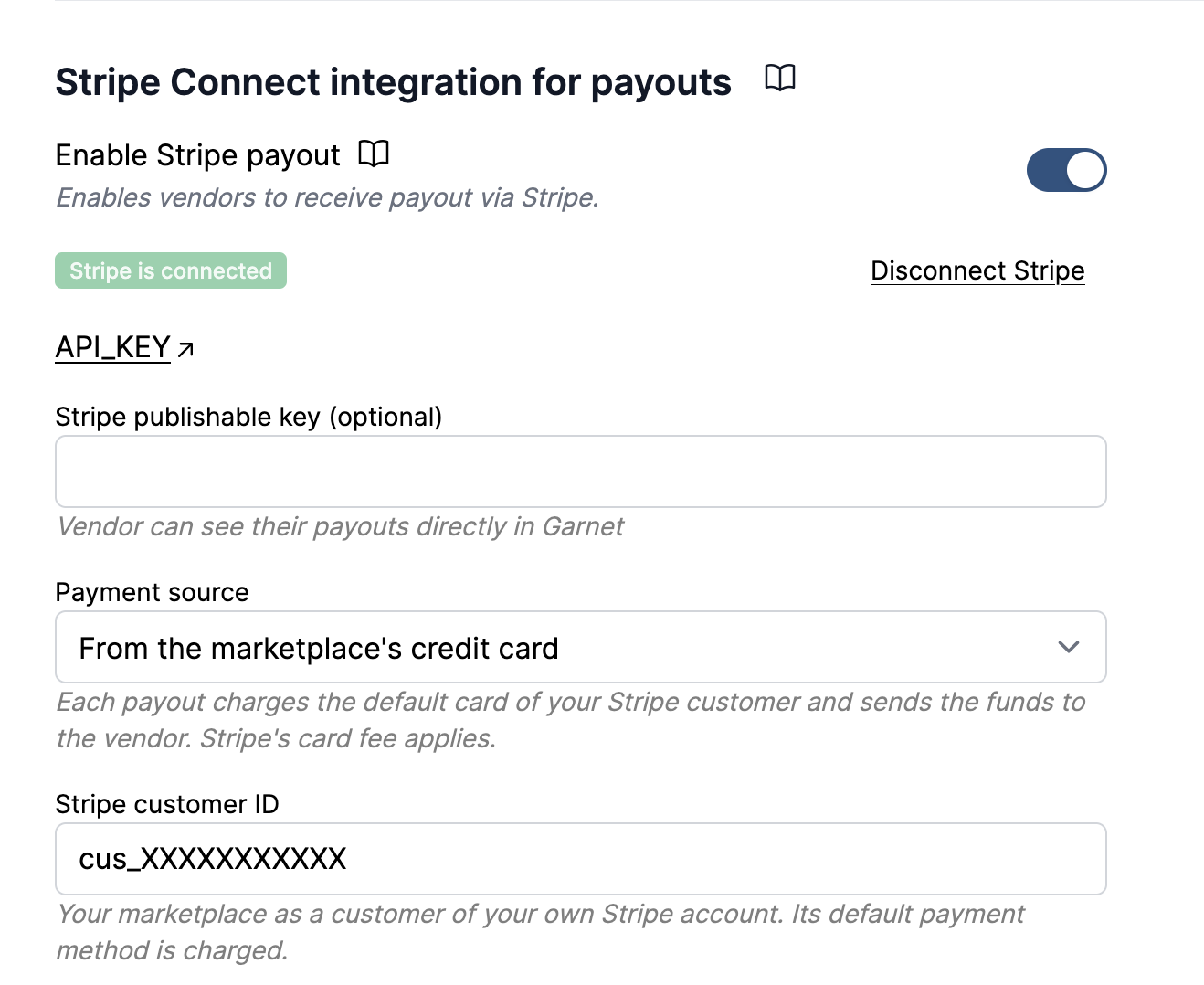
Garnet can pay vendors in two ways, set in Admin panel > Finance > Payout methods > Stripe Connect integration for payouts under Payment source. This page assumes the Stripe integration is set up.
Compare the two sources
From the Stripe balance (default) | From the marketplace's credit card | |
|---|---|---|
| How | A Stripe transfer from your balance to the vendor's account | Stripe charges the card saved on your own Stripe customer for the payout amount and routes it to the vendor |
| Cost | ✅ Only the Stripe Connect fees every payout pays | ❌ The Stripe Connect fees, plus the card fee on every payout: about $15 to $30 on a $1,000 payout |
| Funds needed | ❌ Your balance must already hold the amount: top it up from your bank before each payout, unless customers already pay through this Stripe account | ✅ None, the card is charged at the moment of the payout |
| Stripe fee | ✅ None | ❌ Stripe's card fee on every payout, charged to the marketplace, about 1.5% to 3% plus a fixed amount depending on the vendor's country |
| Currency conversion | Stripe's conversion fee when the vendor settles in another currency | The same conversion fee |
| Amount sent | ❌ Sent in the marketplace currency, Stripe converts it on arrival at the live rate, so the vendor sees the marketplace amount first | ✅ The payment settles directly in the vendor's currency, the vendor sees one payment in their own currency |
| Vendors abroad | ❌ Only vendors in Stripe's cross-border regions (US, UK, EEA, Canada, Switzerland); Stripe rejects the transfer elsewhere | ✅ Any country where Stripe Connect is available, the charge is made on behalf of the vendor |
| When it fails | Insufficient balance: the vendor is listed under Failed payouts and retried at the next payout | Card declined or expired: same retry at the next payout |
In short, the balance is cheaper but needs a bank transfer to Stripe before every payout, and the card costs a fee on each payout but works everywhere without any funding step.
From the Stripe balance
If the balance cannot cover a transfer, Stripe rejects it with You have insufficient funds in your Stripe account and the vendor is listed under Failed payouts in the payout report. Garnet retries the failed vendors at the next scheduled payout, so nothing is lost, but the money has to be on the balance first.
- If customers pay through this same Stripe account, the balance fills itself.
- Otherwise add funds from your bank:
Stripe > Balance > Add to balance, selectPayments balanceand transfer the amount from your bank account. Stripe only accepts bank transfers and bank debits here, never a card. In the UK a Faster Payments transfer is available within the hour. See Stripe's guide.
TIP
When you fund the balance by bank transfer, set your Stripe payouts to manual in Stripe > Settings > Payouts. With automatic payouts, anything above the minimum balance is sent back to your bank a few days later, and the next vendor payout fails again.
From the marketplace's credit card
Garnet charges your card and sends the funds to the vendor in one Stripe payment, so you never need to keep a balance. To set it up:
- In
Stripe > Customers, create a customer for your own marketplace and save the card to charge on it, set as its default payment method. Copy the customer ID, it starts withcus_. - In Garnet, choose
From the marketplace's credit cardand paste the customer ID inStripe customer ID. Garnet charges the customer's default payment method, so to change the card later, change the default in Stripe.
The card must be the customer's default payment method
Saving a card on the customer is not enough: Garnet only ever charges the card set as the default payment method. A card added from the Stripe dashboard, or saved through a payment link, is attached to the customer but is not made the default, and the customer page lists it exactly the same way — so the setup looks complete while every payout fails with Stripe customer cus_… has no default payment method. The vendor stays unpaid and no payment appears in Stripe, since the charge is never attempted.
To fix it, open the customer in Stripe > Customers, then on the card under Payment methods use the ⋯ menu and click Set as default. Then retry the payout from Garnet > Finance.
Each payout appears on your Stripe account as a payment Garnet payout to <vendor> followed by a transfer to the vendor, and on the vendor's account as a payment for the full amount in their own currency. Stripe's card fee is debited from your balance in the vendor's currency, so a marketplace paying vendors abroad accumulates small negative balances in those currencies; Stripe settles them against your bank account.