
Remove a vendor
The marketplace can remove a vendor from the vendor details page: open the vendor from Garnet > Vendors, then click Remove vendor. A confirmation window lists what will be deleted and what will not change for this vendor, before anything happens.
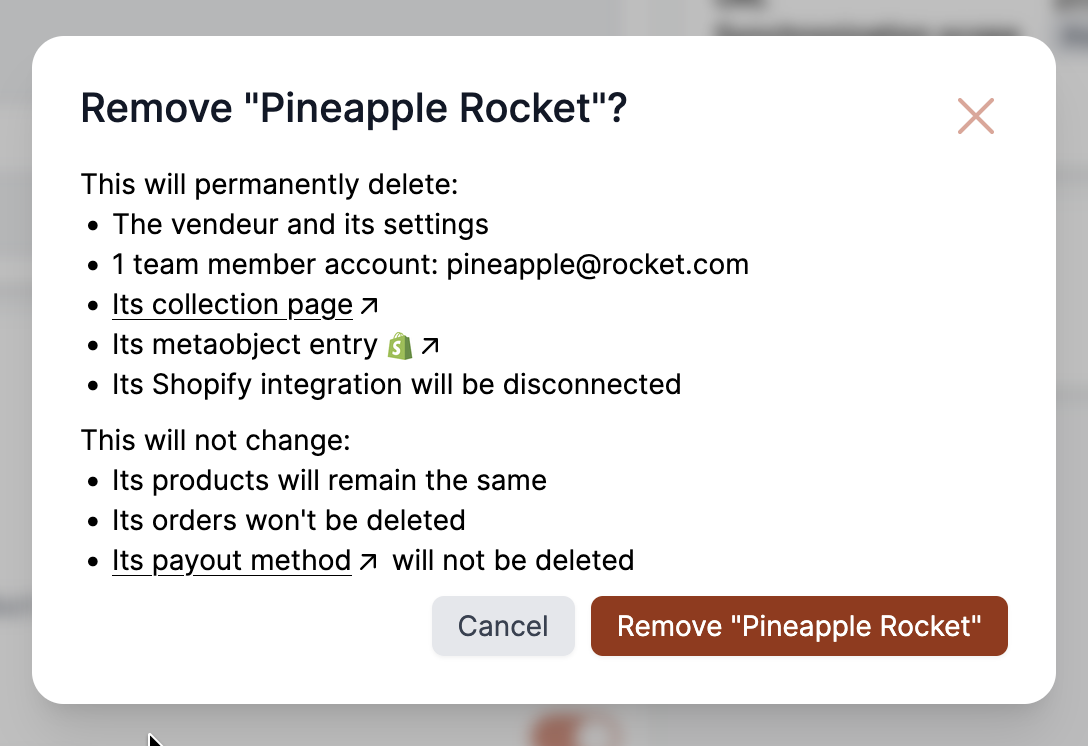
When removing a vendor, Garnet permanently deletes:
- The vendor and its settings.
- All their team member accounts, listed by email.
- Their collection page, linked to the live page on your store.
- Their metaobject entry, the vendor profile, linked to the entry in Shopify Admin.
- Their integration is disconnected: orders and tracking no longer flow between the vendor's store and the marketplace. The window names the platform, e.g.
Its Shopify integration will be disconnected.
Each line only appears when the vendor has it.
What does not change:
- Their products remain the same, as a safety measure. You can remove them from Shopify to delete them forever.
- Their orders are not deleted.
- Their membership is not cancelled. The line links to the subscription in Stripe.
- Their payout method is not deleted. The line links to the Stripe connected account or the Mollie dashboard, when the vendor uses one of them.
Past orders
If some orders were placed with the vendor, the vendor will remain in Garnet's vendor list.
INFO
Stripe linked accounts will be kept in Stripe in case there are payouts to be sent later. Cancel the membership in Stripe if the vendor should stop paying.