
Bank transfer integration
Accessible on request only
This feature is available on request. Contact us to get it enabled for your marketplace.
Overview
Bank transfer payouts allow vendors to register their banking details directly in Garnet. The marketplace operator can then process payouts manually via their bank.
Unlike Stripe or PayPal, bank transfer does not automate the payment — it provides a structured way for vendors to submit their banking information per region (SEPA, ACH, SWIFT, etc.).
Setup
- Go to
Admin Panel > Finance > Payout methods > Bank transfer - Toggle
Enable bank transfer payout - Select the bank regions you want to make available to your vendors (e.g. Eurozone SEPA, United States, International)
- Click
Save
Vendor experience
Once enabled, vendors will see Bank transfer as a payout method option in their Settings > Payouts page.
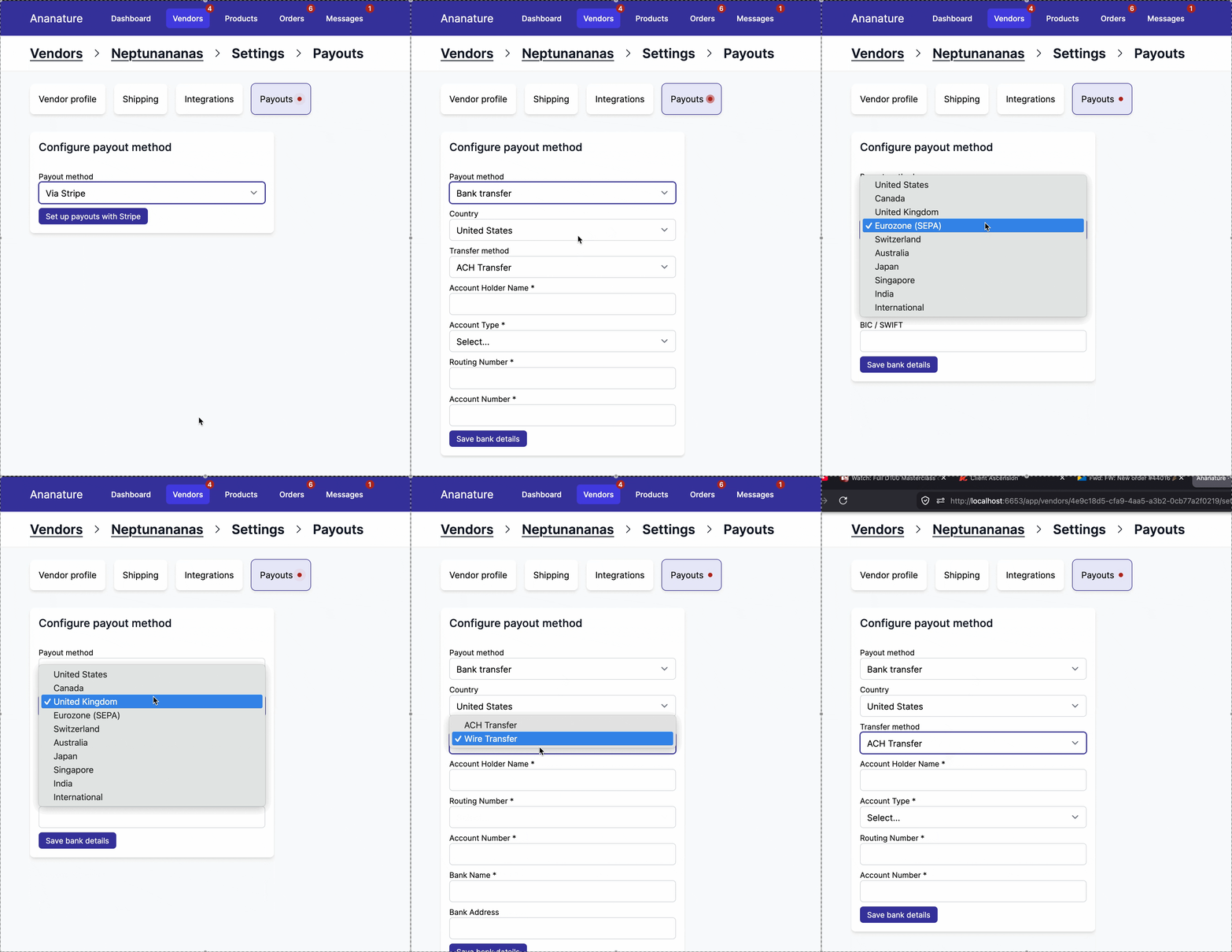
They will be asked to:
- Select their country/region
- Choose a transfer method (if multiple are available for that region)
- Fill in their banking details (IBAN, account number, routing number, etc.)
Processing payouts
When a payout is due, the marketplace admin initiates a payout from Orders > Payouts. Garnet will generate a payout request containing each vendor's banking details and the amount owed.
The admin can then:
- Export the payout as a CSV — the file contains all vendor banking details and amounts, ready to be uploaded to your bank's bulk transfer tool
- Process each transfer manually — use the vendor's banking details displayed in the payout screen to send individual wire transfers
Once the transfer has been sent, the admin marks the payout as completed in Garnet.
For scheduled payouts, a link to a secure CSV file is included in the payout email, allowing the admin to download and process the bulk transfer directly.
Coming soon
CSV export for bulk transfers is under development. Contact us for early access.
Security
Vendor banking details contain sensitive information (account numbers, IBAN, routing numbers, etc.). Garnet takes the following measures to protect this data:
- Encryption at rest — All sensitive banking fields are encrypted using a unique secret key per marketplace. This ensures that even in the event of a data breach, banking details cannot be read without the marketplace's encryption key.
- Field-level sensitivity — Only fields marked as sensitive (account numbers, routing numbers, IBAN, etc.) are encrypted. Non-sensitive fields like account holder name and bank name are stored in plain text for display purposes.
- Access control — Banking details are only visible to the vendor who submitted them and to marketplace admins when processing payouts.
- No historical data — For compliance, Garnet does not store past banking details. When a vendor updates their banking information, the previous record is overwritten. This minimizes exposure in case of a data breach.
- Regulatory compliance — Per-marketplace encryption keys and the absence of historical banking data help comply with local data protection regulations (GDPR, PCI DSS guidelines for non-card payment data).
Available regions
| Code | Region | Methods |
|---|---|---|
| US | United States | ACH, Wire Transfer |
| CA | Canada | Electronic Funds Transfer (EFT) |
| GB | United Kingdom | Faster Payments / BACS |
| EU | Eurozone | SEPA Credit Transfer |
| CH | Switzerland | SEPA Transfer |
| AU | Australia | BECS Direct Entry |
| JP | Japan | Domestic Bank Transfer (Zengin) |
| SG | Singapore | FAST / GIRO |
| IN | India | NEFT / IMPS |
| GLOBAL | International | SWIFT Wire |