
Magento integration
Integration scope
- ❌ Easy install with Garnet Seller
- ✅ Product synchronisation
- ✅ Order synchronisation
- ✅ Tracking synchronisation
Supported versions: Magento Open Source and Adobe Commerce 2.4.4 and later, and Mage-OS. Adobe Commerce as a Cloud Service (SaaS) is not supported yet.
Product synchronisation delay
Magento does not send product updates to other systems, so Garnet checks for changes every 15 minutes. A product change (name, price, images…) can be up to 15 minutes late, and so can the stock of a product sold in Magento.
Create the integration in Magento
The vendor creates an integration in their Magento admin, then copies its credentials into Garnet.
Go to
System > Extensions > Integrationsand click Add New Integration.Give it a name (for example
Garnet Marketplace). Leave Callback URL and Identity link URL empty.Enter your admin password in Your Password.
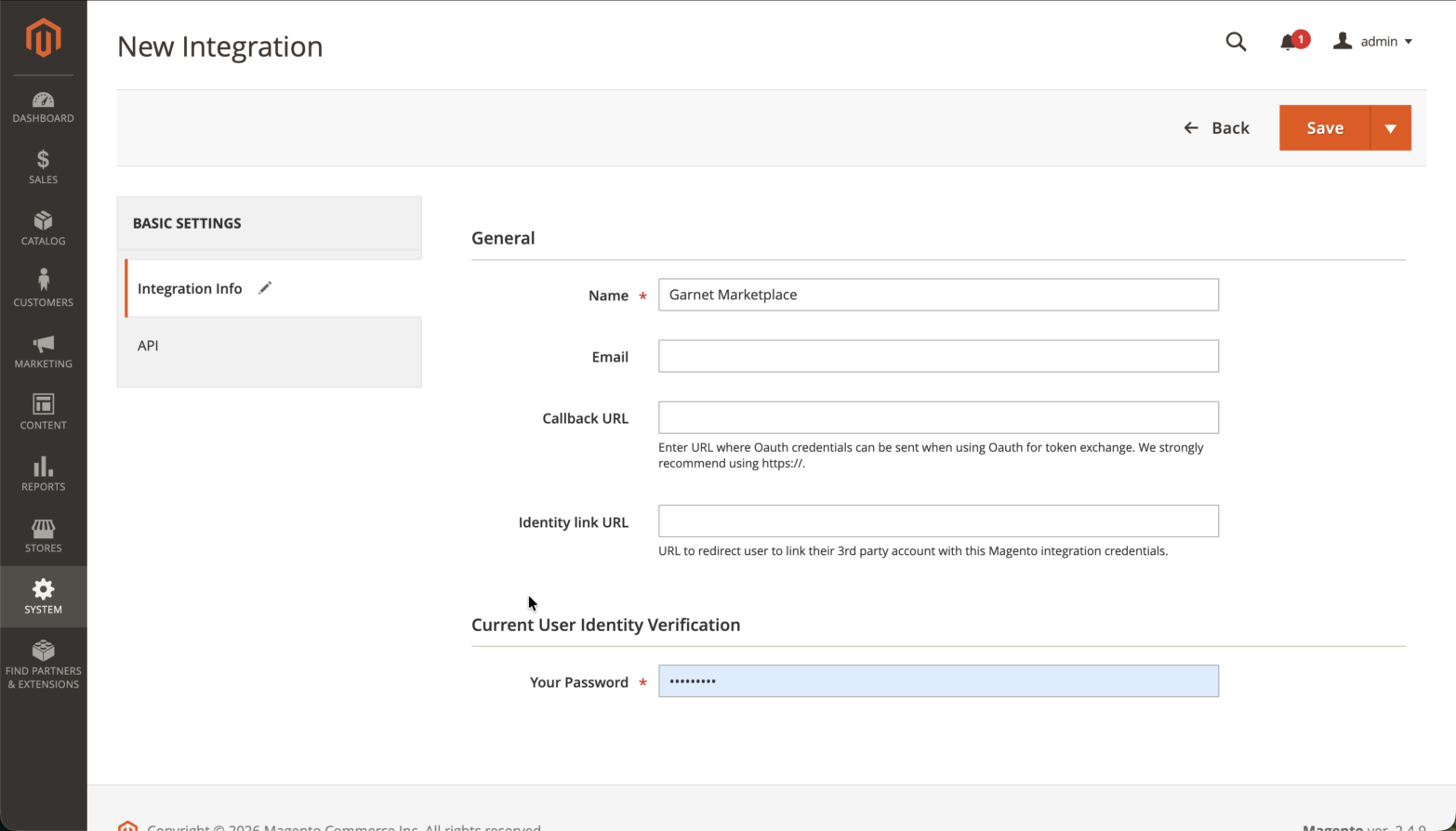
Open the API tab, set Resource Access to
Custom, and tick the resources listed below.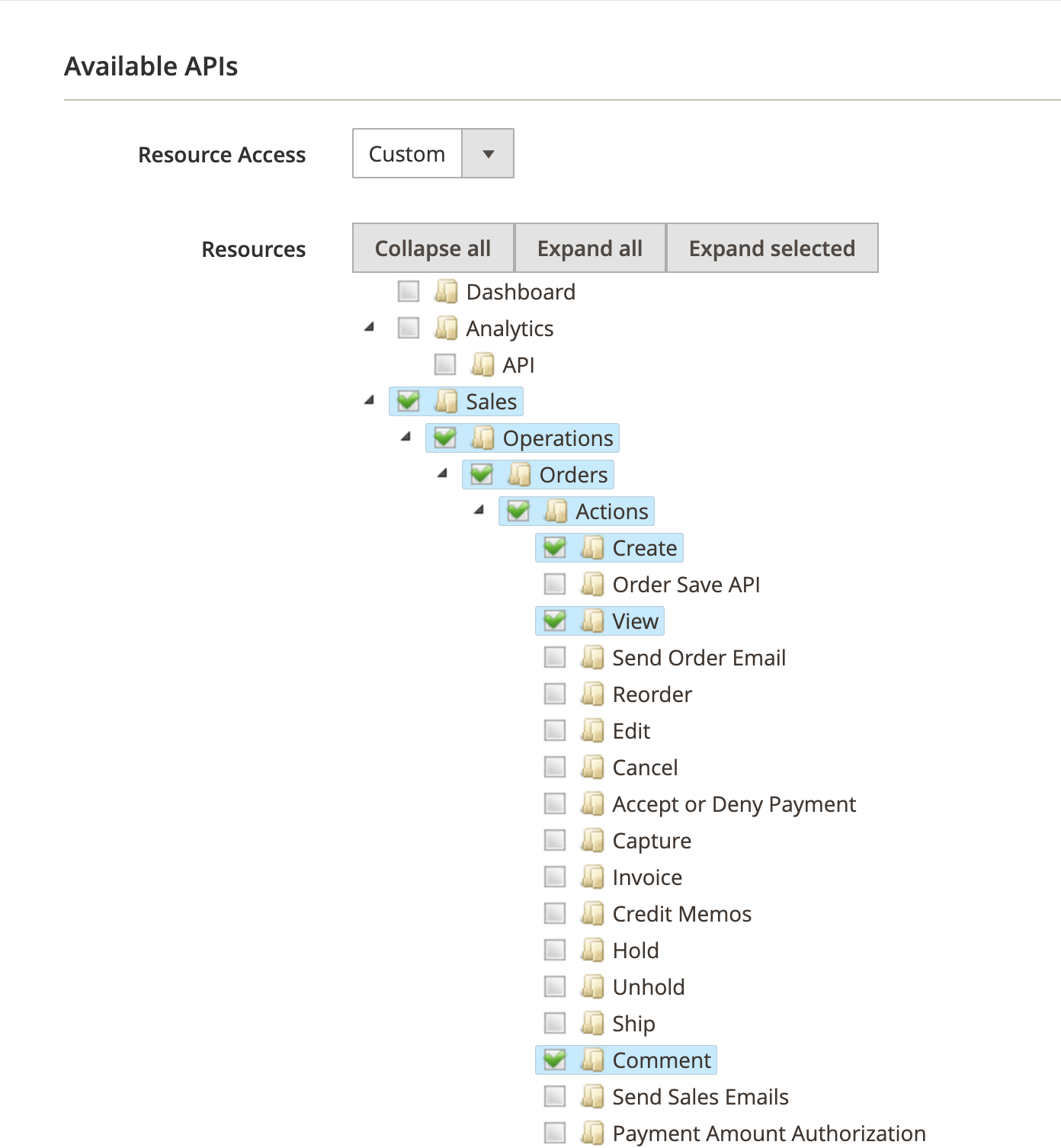
Click Save, then Activate next to the integration, then Allow.
Magento shows four values: Consumer Key, Consumer Secret, Access Token and Access Token Secret. Paste them into
Garnet > Settings > Integrations > Magento, with your store URL.
Garnet checks the credentials and every resource when you click Connect, and tells you which resource is missing.
Changing the resources of an active integration
Ticking a resource on an integration that is already active has no effect until you click Reauthorize next to it in System > Extensions > Integrations. Reauthorizing issues a new Access Token and Access Token Secret: paste them into Garnet again.
No security setting to change
You do not need to turn on "Allow OAuth Access Tokens to be used as standalone Bearer tokens". Garnet signs its requests, which is the secure default.
Required resources
Listed in the order of the API tab tree.
| Resource | Why |
|---|---|
Sales > Operations > Orders > Actions > View | Find forwarded orders |
Sales > Operations > Orders > Actions > Comment | Mark forwarded orders with the marketplace order number |
Sales > Operations > Shipments | Read tracking numbers |
Catalog > Inventory | Read products, their variants and their stock. Tick Inventory itself: it ticks Products with it, while ticking only Products leaves stock unreadable |
Carts > Manage carts | Place forwarded orders |
Stores > Settings > All Stores | Read the store view, currency and image URL |
Stores > Attributes > Product | Read variant option names (size, colour, …) |
If the tree shows a Stores > Inventory branch, your store uses Multi-Source Inventory: also tick Stores > Inventory > Sales Stock, which Garnet needs to read salable stock. Stores without it do not have this branch, and nothing else is needed.
Advanced settings
| Setting | Default | What it does |
|---|---|---|
| Store view code | default | The store view products are read from (names, prices) and orders are placed in. |
| Shipping method | flatrate_flatrate | The shipping method of forwarded orders, as carrier code_method code. It must be enabled for the customer's country. |
| Payment method | checkmo | The payment method of forwarded orders. Use an offline method: the customer already paid on the marketplace. |
We recommend creating a free shipping method for marketplace orders, since the customer already paid for shipping on the marketplace. With the default flat rate, Magento adds its own shipping fee to the forwarded order.
Stock
With Multi-Source Inventory (on by default in Magento 2.4), Garnet publishes the salable quantity of the store view's website: the stock minus the orders not shipped yet. Without it, the product's stock quantity.
Products
Simple and configurable products are imported. A configurable product becomes one marketplace product with one variant per child product, and its options (size, colour, …) become the variant options. Bundle, grouped and downloadable products are skipped.
The price is the product's price, or its special price while it runs, in the base currency of the store view's website. Catalog price rules and tier prices are not applied.
Orders
When a marketplace order contains the vendor's products, Garnet places an order in Magento, as a guest checkout, with the vendor's catalogue prices and the configured shipping and payment methods. The order gets a private comment [Marketplace] Order #1234 so the vendor can trace it.
The customer's email is replaced by a placeholder, so Magento's order emails do not reach the marketplace's customer. Turn off Obfuscate customer emails to forward the real address.
Tracking
When the vendor creates a shipment with a tracking number, Garnet fulfils the marketplace order within the hour.