
Appearance
Shipping rate tester
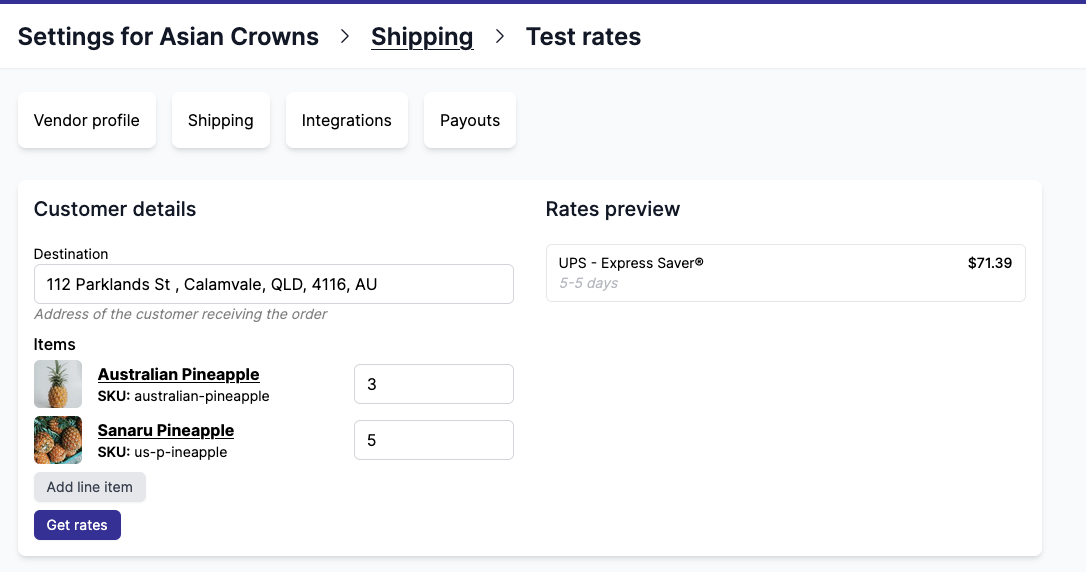
The shipping rate tester lets you simulate the exact shipping rates displayed at checkout. Set a customer delivery address and select the line items in the cart, and Garnet will compute the exact rates just like Shopify would at checkout.
This is useful to verify your shipping configuration before going live or to debug unexpected rates. It supports both flat shipping rates and live shipping rates.
How to use it
- Go to
Garnet > Admin Panel > Shipping > Test rates - Enter the customer delivery address
- Select the line items to include in the cart
- Click
Get rates— Garnet computes and displays the exact shipping rates that would appear at checkout