
Appearance
Analytics
Garnet provides built-in analytics to help you understand how your marketplace is performing. Track product views, add-to-cart events, and purchases directly from your dashboard and at the product level.
How it works
Garnet installs a lightweight tracking pixel on your storefront that automatically collects three key events:
| Event | Description |
|---|---|
| Product views | A customer views a product page |
| Add to cart | A customer adds a product to their cart |
| Purchase | A customer completes a checkout |
These events are collected in real time from Shopify and displayed in your dashboard. Garnet automatically filters out bots (Google, ChatGPT, etc.) to ensure your data reflects real customer activity.
Analytics scope
You can control who sees analytics data from Admin Panel > General > Analytics.
| Scope | Description |
|---|---|
| Off | Analytics tracking is disabled |
| Admin only | Only marketplace admins can see analytics |
| All | Both admins and vendors can see analytics |
When set to All, vendors can see the number of page views and conversion rates for their own products.
Dashboard analytics
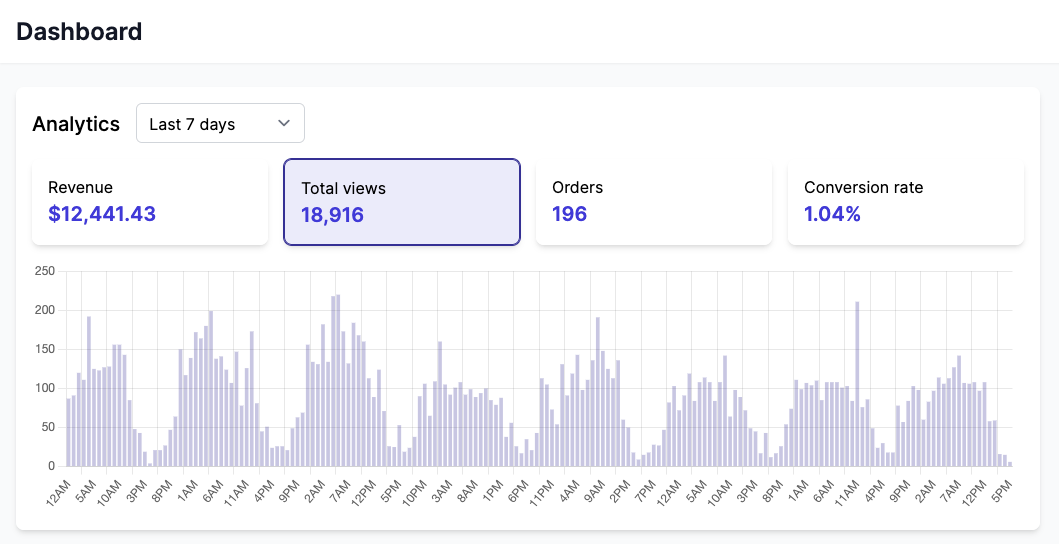
The dashboard shows an overview of your marketplace performance over a selected time range:
- Revenue — total revenue from orders
- Total views — number of product page views
- Orders — number of orders placed
- Conversion rate — percentage of views that resulted in an order, exactly the number of views divided by the order count.
You can select different time ranges (today, last 7 days, last 30 days, last 90 days, last year) to compare performance over time.
TIP
If you recently enabled analytics, a warning will indicate that historical data may not be available for the full date range.
Product-level analytics
When editing a product, an analytics card shows the last 30 days of performance for that specific product:
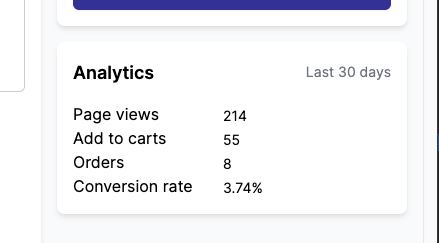
- Page views — how many times the product page was viewed
- Add to carts — how many times the product was added to a cart
- Orders — how many times the product was purchased
- Conversion rate — percentage of views that resulted in a purchase
This card only appears when analytics is enabled and the product has received at least one event.